Akan Runtime
Akan applications run on a Bun-based runtime that connects app code, generated artifacts, server routes, and pages. The app entry point (main.ts) starts the runtime, and Akan handles the server shape behind it.
apps/myapp/main.ts
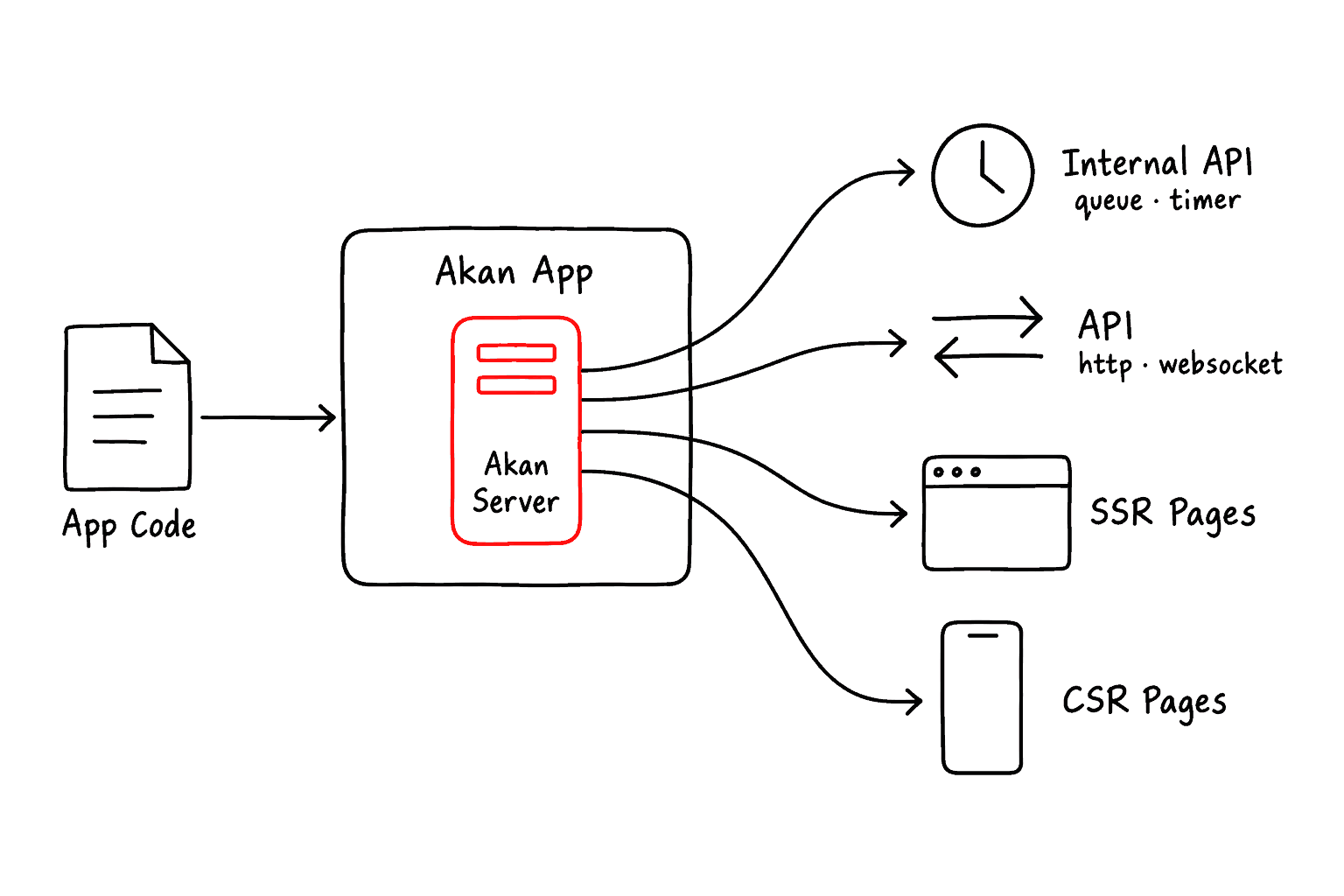
When Akan App starts, Akan Server prepares everything the app can serve. In practice, the runtime exposes four kinds of work.
- Internal API (Queue, Timer, etc.): internal work that runs without a browser request.
- API (HTTP, WebSocket): public communication for data requests and realtime updates.
- SSR Pages (Web): web pages rendered by the server and sent to the browser.
- CSR Page (Android, iOS): client-rendered pages used by native targets.
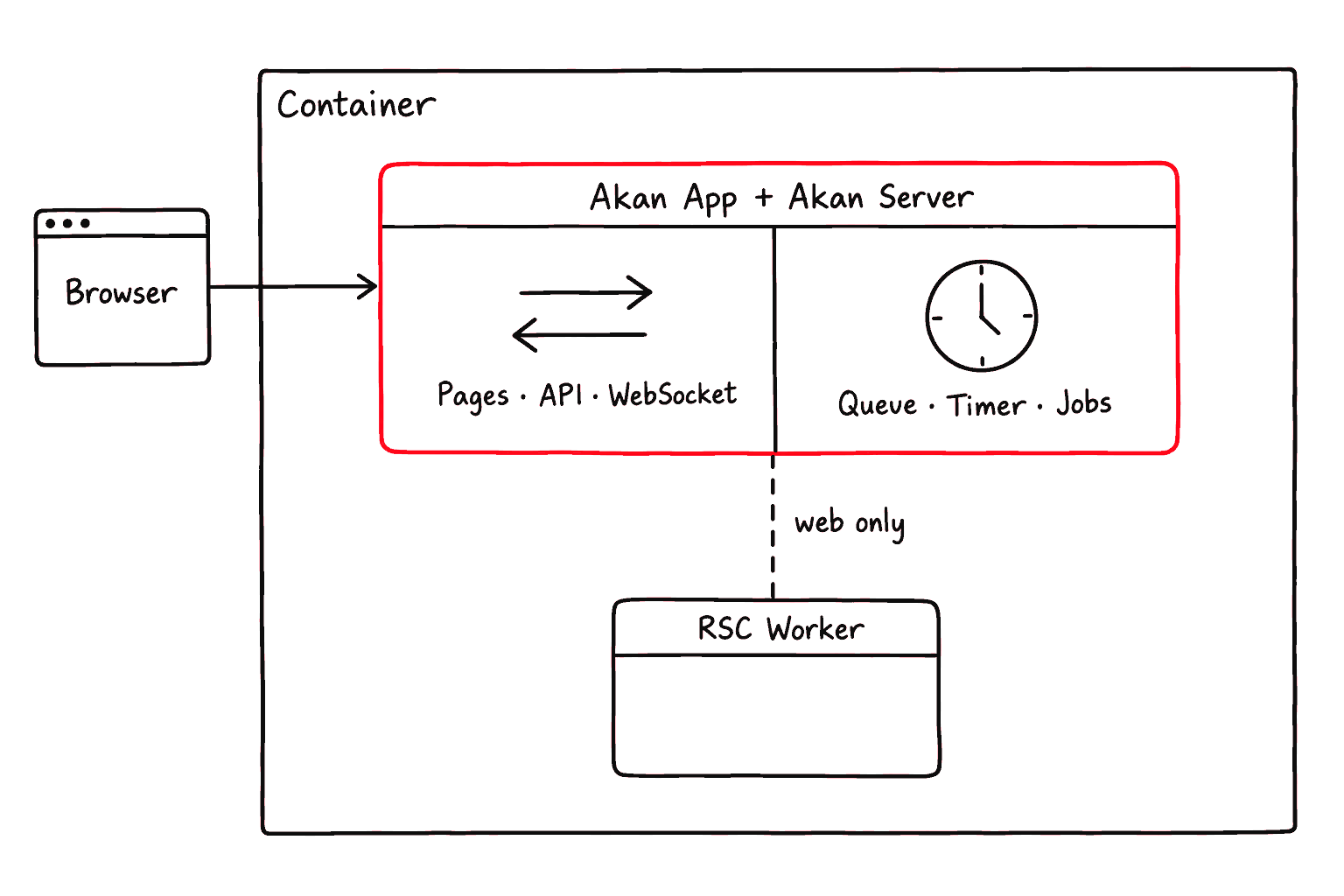
AKAN_REPLICA decides how many server processes each role gets, and it defaults to 0,0,1 everywhere: one all server and nothing else. With a single traffic replica there is nothing to balance, so Akan App runs that server inside its own process instead of spawning it and proxying to it. The container holds one process, and every request skips a proxy hop.
- all: runs both federation and batch behavior in one server process. This is the default, and the shape almost every deployment ships.
- federation: serves browser traffic such as pages, API calls, and WebSocket connections.
- batch: runs background work such as queues, timers, and scheduled jobs.
Five things bring the gateway back: two or more replicas, a batch-only replica that never listens, AKAN_SOLO=false, passing replica to new AkanApp(...), and akan start. Then Akan App spawns the servers and load-balances browser traffic across the ready federation and all processes.
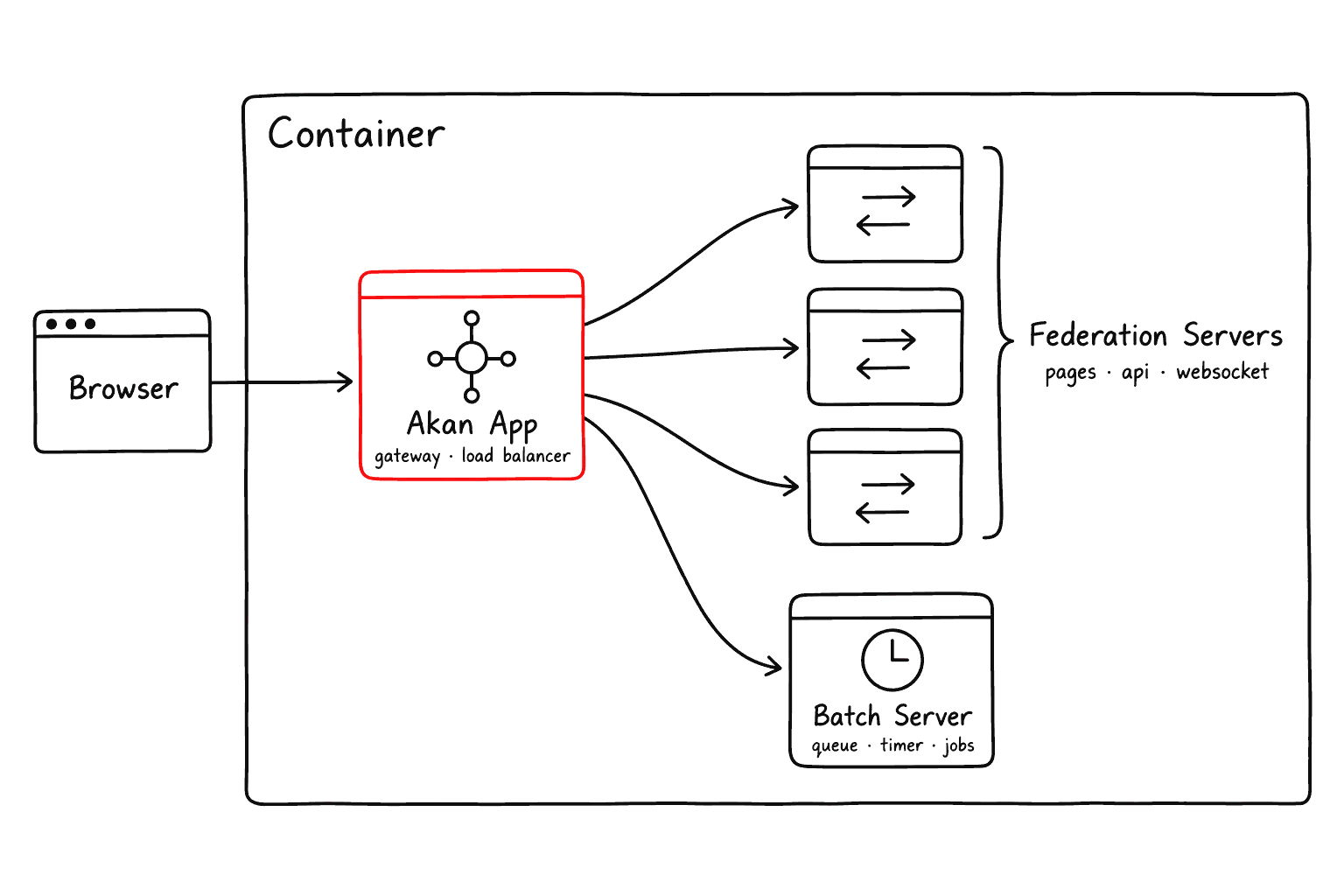


A single Akan App has built-in clustering. You can run multiple server replicas and let Akan App distribute traffic, without setting up separate local load-balancing tools such as nginx, docker compose, or pm2.
Identity And Environment
The root .env file decides which organization, domain, environment, operation mode, and log level the app uses while it runs. Most projects keep these values stable, but changing them lets the same app behave like a local, debug, develop, or production-like service.
.env


Environment variables prefixed with AKAN_PUBLIC_ are public. They can be read by browser code, so never store secrets, private tokens, or credentials in them.
Four of those names answer who this app is and where it runs, and the first two are required:
AKAN_PUBLIC_REPO_NAMEstringrequired
Organization or repository namespace, usually fixed for the life of the project.
AKAN_PUBLIC_SERVE_DOMAINstringrequired
The domain the app builds links, callbacks, and domain-based routes from.
AKAN_PUBLIC_ENVlocal | debug | develop | main | testingdefault debug
Which data set the app runs against, from local test data up to production-like main.
AKAN_PUBLIC_OPERATION_MODElocal | edge | cloud | moduledefault local when ENV=local, else cloud
Where clients connect: local runtime, cloud, or edge paths; module is only in the type.
In practice you move two of them together. Build a feature with ENV=local and OPERATION_MODE=local, switch ENV to debug or develop when you need shared data or shared services, and deploy with ENV=main against whichever operation mode the cluster serves:
.env
Two more narrow who reaches the server, for one only its own computer calls, such as the server a desktop app carries:
AKAN_LISTEN_HOSTstringdefault every interface
The one address the server binds, such as 127.0.0.1.
AKAN_ALLOWED_HOSTShost:port, …
The Host headers it answers; any other request, socket upgrade and preflight included, gets 403.
A server that renders pages calls itself at localhost:<PORT>, so list that in AKAN_ALLOWED_HOSTS too, and keep AKAN_LISTEN_HOST on an address localhost reaches.
Database Variables
Which database mode a deployment runs and where its data lives are the deployment's to say. These variables win over the same values in
env.server.ts, so one image can serve several deployments:AKAN_DATABASE_MODEsingle | multiple | clusterdefault the first declared mode
One of
database.modes; a deployment of a build that declares several must set it.AKAN_SQLITE_DIRstringdefault /workspace/sqlite in the image
The folder for any SQLite file no path names: the database, and
single's cache and queue file.SQLITE_DATABASE_PATHstring
Moves the database file alone, in
single and multiple; it wins over AKAN_SQLITE_DIR.AKAN_SOLID_DB_PATHstring
The SQLite file where
single keeps its cache, queue and pubsub.POSTGRES_URLstring
The
cluster database (alias POSTGRES_URI), with pool size and SSL in its query string.POSTGRES_HOSTstringdefault localhost
The URL in parts, with
POSTGRES_PORT, POSTGRES_DATABASE, POSTGRES_USER, POSTGRES_PASSWORD.POSTGRES_INSIGHT_URLstring
Logs the SQL console in on
cluster, as a role that may read base columns only.REDIS_URIstringrequired outside local
The one Redis every instance of
multiple or cluster shares; rediss:// turns on TLS.AKAN_STORAGE_SHAREDtrue | 1
Every instance mounts one upload volume; disk uploads in
multiple and cluster need it.An app that declares
database: { modes: ["single", "cluster"] } ships one image that serves both of these:.env
- Only local development may skip
REDIS_URI. A developer machine falls back to localhost, or toREDIS_HOSTwhenakan startruns against a shared environment. - Behind a PgBouncer in transaction mode, add
prepare=falsetoPOSTGRES_URL; the driver reads every such setting from the query string.
Uploads need storage every instance reads. A deployed
multiple or cluster app keeps them in object storage, or on one volume every instance mounts with AKAN_STORAGE_SHARED=true. Outside development, an upload to a disk only one instance reads is refused.Text Search Variables
Full-text search is on unless you switch it off, and both of its variables are deployment-wide decisions rather than per-process ones, so give every process in one deployment the same pair.
AKAN_SEARCH_ENABLED0 | 1 | false | truedefault unset means on
Turns the full-text index off, reversibly.
AKAN_SEARCH_TOKENIZERstringdefault unicode61 remove_diacritics 2
fts5 tokenizer (Postgres: unicode61 or trigram);
database.search.tokenizer in env.server.ts wins.Changing the tokenizer rebuilds the index from the mirror on the next boot. Of processes restarted at once, the first rebuilds and the rest wait for it; on SQLite a process waits only up to its busy timeout, so stagger the restart when the mirror is large.
Logging Variables
The level ladder is trace, verbose, debug, info, warn, error, and three destinations read it independently: the container's stdout, the rotating log file, and any sink the app registered. Everything else here decides how much structure travels with a record and who is allowed to ask for more.
AKAN_PUBLIC_LOG_LEVELtrace | verbose | debug | info | warn | errordefault info
How much runtime output the console carries; the deprecated log means info.
AKAN_LOG_STDOUT_LEVELtrace | verbose | debug | info | warn | errordefault AKAN_PUBLIC_LOG_LEVEL
What goes to the container's stdout, in either format; info is the production pick.
AKAN_LOG_FILE_LEVELtrace | verbose | debug | info | warn | errordefault trace
How much structured Logger output goes to files, independent of the console level.
AKAN_LOG_FORMATtext | ndjson | ndjson-onlydefault text
text for people; ndjson makes stdout one JSON record per line, ndjson-only the file too.
AKAN_LOG_TO_FILE0 | 1default 1
Writes gateway and child logs to runtime/logs; off in the production image.
AKAN_LOG_DIRstringdefault runtime/logs
Where file logging writes, when the default directory is not where the volume is mounted.
AKAN_LOG_MAX_SIZE_MBnumberdefault 50
Create the next sequence file when a process log reaches this size.
AKAN_LOG_MAX_FILESnumberdefault 100
Keep this many rotated files per process key, such as gateway or child-0.
AKAN_LOG_CONTEXT0 | 1default 1
Tags each call's records with traceId, endpoint and origin; independent of AKAN_TRACE.
AKAN_LOG_STREAM0 | 1default 0
1 forwards child records to the gateway always, not only while akan logs or .tail listens.
AKAN_LOG_STREAM_TOKENstringdefault unset — route absent
Mounts GET /_akan/app/logs, an SSE stream of the ring buffer, for a matching bearer token.
AKAN_LOG_CANONICAL0 | 1 | all | slowdefault 0
One record per call at its end; 1 or all logs every call, slow only failed or slow ones.
AKAN_LOG_FLIGHT0 | 1default 0
Buffers each call's last 64 sub-level records; promotes them if it failed or ran slow.
AKAN_LOG_FLIGHT_MSnumberdefault 1000
A call at least this long is slow, for the flight recorder and the slow canonical mode.
AKAN_LOG_FLIGHT_MAXnumberdefault 65536
Caps the records the process holds at once; a call past the cap runs unrecorded.
AKAN_LOG_BUFFERnumberdefault 2000
How many records the in-memory hub keeps for akan logs and the SSE stream to replay.
AKAN_LOG_BUFFER_MBnumberdefault 4
The same buffer's byte ceiling; whichever limit is reached first applies.
AKAN_LOG_DEBUG_HEADERstringdefault unset — local only
The secret x-akan-debug must carry outside local to log that one request at trace.
The ring the gateway (or the solo replica) keeps for akan logs --replay and .trace holds AKAN_LOG_BUFFER records or AKAN_LOG_BUFFER_MB, 2,000 or 4 MB by default, whichever fills first, and the older record goes first.
getEnv()
getEnv() is the runtime helper that turns .env values into the information your app actually uses. Instead of hand-writing API URLs or WebSocket URLs, app code can read the prepared values from getEnv().
Using getEnv()
Local mode
When OPERATION_MODE is local, getEnv() points the browser and API client to your local Akan runtime, usually localhost:8282.
local
Cloud / edge mode
When OPERATION_MODE is cloud or edge, getEnv() builds service URLs from the app name, environment, and serve domain.
cloud / edge
Use getEnv() when application code needs runtime addresses or environment identity. It keeps URL decisions in one place and makes local, cloud, and edge modes easier to switch.
OpenAPI JSON
Akan can expose the HTTP query and mutation surface declared in signal files as an OpenAPI 3.1 document. This is useful when you want to connect Swagger, Redoc, external clients, or SDK generation tools to the same API shape Akan already uses.
apps/myapp/main.ts
After enabling it, request /openapi.json from the app origin. In local mode, the document is usually available at localhost:8282/openapi.json. The normal API prefix stays at /api; OpenAPI JSON is served as a framework metadata route.
Read the OpenAPI document
App option
Use this when the app should always expose OpenAPI JSON in that entry point.
new AkanApp("./server", { openapi: true })
Environment variable
Use this when deployment or local scripts should decide whether the endpoint is available.
AKAN_OPENAPI=true
Server option
Use this when you start AkanServer directly instead of going through AkanApp.
new AkanServer("myapp", env, "all", lib, { openapi: true })
OpenAPI JSON is opt-in. Enable it only for environments where exposing API structure is acceptable, because it describes routes, request fields, response schemas, and guard metadata.
Selective Module Boot
An app mounts every module its libraries declare. The modules option narrows that: name the modules a process should serve and Akan boots those plus the ones they depend on, leaving the rest out of the container entirely. A module left out has no service, no signal, no route, and no scheduled job. This is how one codebase runs as several small processes, such as a batch worker that only needs its own domain.
apps/myapp/main.ts
Dependencies are followed for you, so you list entry points instead of the whole graph. A named module pulls in every service and signal it injects, and every model its cascade removes.
disableModules and disableLibs work from the other end: mount everything except what you name and whatever reaches it. disableLibs takes a library's name and stands for every module it registers. Both are accepted wherever modules is, and as AKAN_DISABLE_MODULES and AKAN_DISABLE_LIBS in the environment. A module named in both modules and an exclusion is left out.
apps/myapp/main.ts
App option
Use this when the entry point itself decides which modules the process serves. Every replica it spawns gets the same selection.
new AkanApp("./server", { modules: ["article"] })
Environment variable
Use this when deployment decides the split, so one image can run as different processes without a second entry point.
AKAN_MODULES=article,file
Server option
Use this when you start AkanServer directly instead of going through AkanApp.
new AkanServer("myapp", env, "all", lib, { modules: ["article"] })
Selection narrows the enabled set rather than replacing it, so it never turns on a module whose service is disabled. A module that reaches a disabled one goes with it. Endpoints of a module left out do not exist, so a client that calls one gets a 404.
Health, Metrics, Logs
Akan runtime exposes simple ways to check whether the app is alive, how busy it is, and what it is doing. In local development, these are mostly useful when a page does not load or a background job seems stuck.
Health
Use this to check whether the server processes are running and ready. A solo replica answers it itself, in the same shape the gateway uses, so a probe reads one contract either way.
health
Metrics
Use this to see runtime counts such as active requests, WebSocket connections, rooms, and process metrics.
metrics
Logs
Use AKAN_PUBLIC_LOG_LEVEL to choose how much detail appears in the terminal. AkanApp also stores gateway and child process output in runtime/logs by default, using AKAN_LOG_FILE_LEVEL for structured Logger output and rotating files by date and size.
logs
File names include app name, environment, operation mode, local date, process key, and sequence. Direct console.log calls from child servers are captured through stdout/stderr pipes; direct gateway console.log calls are not part of Logger sink capture.
Runtime checks
Developer
Akan App(gateway or solo)
/_akan/app/health
/_akan/app/metrics
Terminal Logs
Running / Ready
Requests, Sockets, Memory
Debug Details
Start with health when the app does not respond. Use metrics when the app responds but feels busy. Increase LOG_LEVEL or enable AKAN_MEMORY_LOG when you need more terminal detail.