Infra Architecture
The business code you write is the same wherever it runs. What changes between a laptop and a cloud is everything around it: where traffic enters, where the app runs, and how data and deployments are managed. That surrounding layer is what this page calls infrastructure.
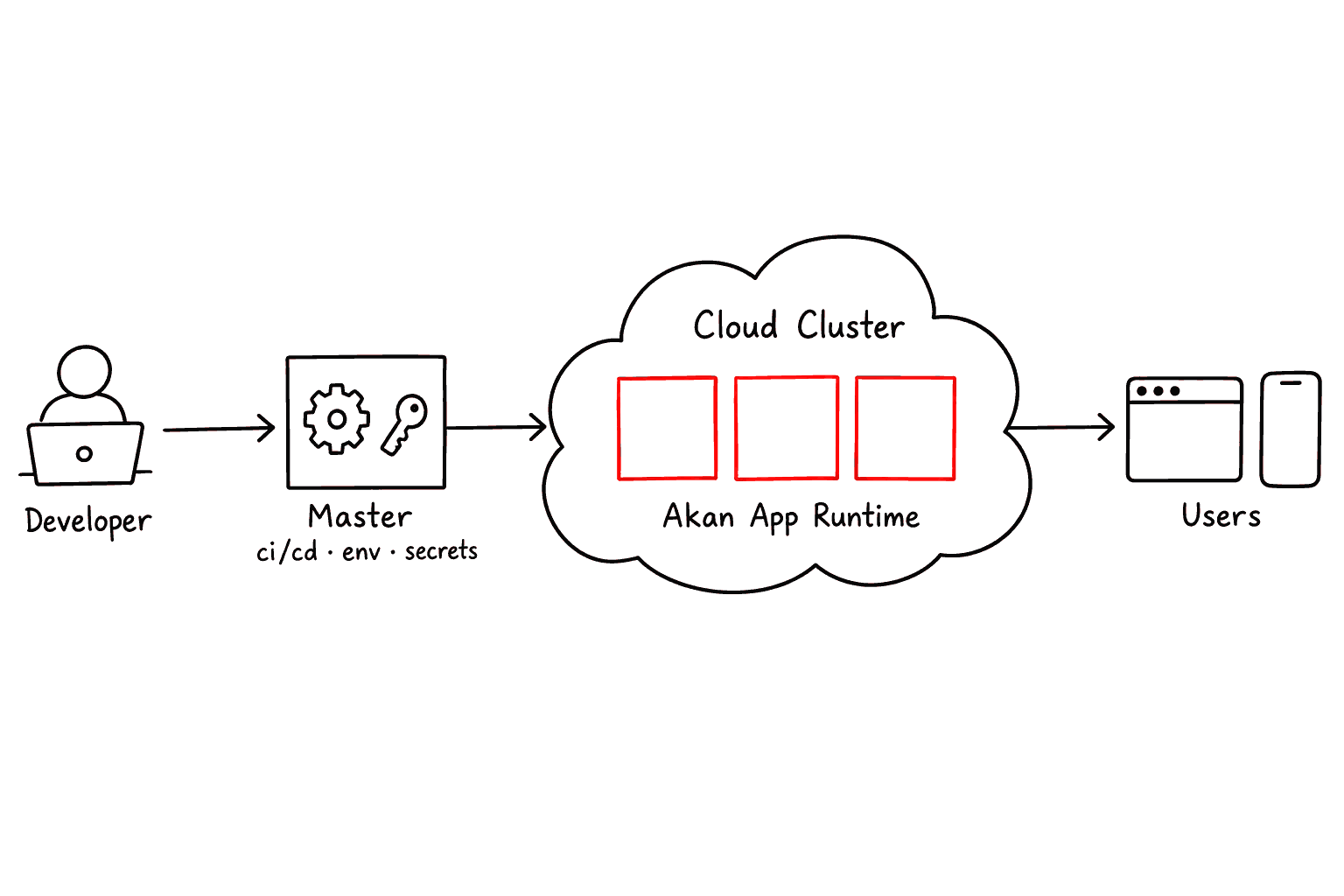
Akan apps run on a developer machine or in a cloud cluster, and the same application code is packaged for both. The infrastructure falls into three areas:
AreaDescription
Local
Your own machine, for fast iteration: MVP screens, feature prototypes and debugging.
Cloud Cluster
A Kubernetes runtime for shared team environments and production-like workloads.
Master
The deployment control area: CI/CD, environment files, secrets and release automation.
Words used on this page
TermDescription
container
The app packaged with everything it needs, so it starts the same way on any server.
pod
Kubernetes's unit of running: one or more containers placed together on one server (a node).
Ingress
The cluster's front door. It takes outside traffic for a domain and routes it inward.
Service
A stable address inside the cluster that forwards to whichever pods run the app.
chart
A Helm package of Kubernetes manifests. The one Akan ships lives in infra/app.
Secret
A Kubernetes object that hands private values, such as database URLs, to pods as env vars.
ReadWriteOnceReadWriteMany
Volume access modes: one node mounts the first, pods on many nodes share the second.
WAL
SQLite's write-ahead log mode, which lets reads keep going while a write is in progress.


There is no edge infrastructure to set up. infra/ carries the cluster chart and the deployment control area only, so an edge site is one container you run yourself: set
AKAN_PUBLIC_OPERATION_MODE=edge and AKAN_DATABASE_MODE=single, and point AKAN_SQLITE_DIR at a volume, which then holds its database and its cache and queue file. The operation mode is independent of the database mode, and only an internal job can be scoped to it (operationMode: ["cloud"]), never an endpoint.Which Option Should I Use?
Start from the product situation, not from the infrastructure name. A small internal tool, a team QA environment and a production service need different levels of infrastructure, so start from the one that describes where you are today:
MVP or feature prototype→ Local
Use local development first. Keep the setup small until the product needs shared data, shared testing, or deployment automation.
Team QA or staging→ Cloud · debug / develop
Use cloud deployment with debug or develop environments so the team can test the same service together.
Production service→ Cloud · main
Use the main branch of the same cloud deployment. The chart runs one pod in single mode; before traffic outgrows it, move that branch to cluster mode with your own Postgres and Redis.
How Traffic Moves
Infrastructure does not change the business code inside your app. It decides how a request reaches the Akan runtime. The path is simple on your laptop and goes through a structured layer in a cloud cluster.
Request paths
Browser Or Device
Domain Or Local Address
Local Dev Server
Cloud Ingress
Kubernetes Service
Akan App Runtime
Page · API · WebSocket · Asset
Local path
A developer opens localhost and talks almost directly to the Akan dev runtime. This is the fastest path for building screens and checking business flows.
Cloud path
A user enters through a public domain. Kubernetes Ingress receives the request, Service finds the right app pod, and the Akan runtime handles the actual page or API response.
Once a request reaches the Akan App Runtime, the runtime sorts it by kind of work. Each kind gets its own kind of answer:
RequestDescription
Page
An SSR or CSR page response for browser users.
API
A business operation, run through signal and service logic.
WebSocket
Realtime updates over a client connection that stays open.
Asset
Static files, client bundles, images and generated output, served as files.
Key idea: infrastructure chooses the route into the app, not the business behavior inside the app. The local and cloud paths look different, but both eventually hand work to the same Akan runtime.
Database Mode
Besides the app itself, a service needs somewhere to keep data, a queue for background work and a cache. The database mode decides which engine fills each of those three roles.
Start with single mode. Most services do not need a separate database cluster on day one. When real performance limits, queue needs or multi-instance operation appear, move up to multiple or cluster mode without changing the business shape of the app.
| Mode | Database | Where it runs | Cache · queue · pubsub |
|---|---|---|---|
| single | One SQLite file | One container | SQLite Solid |
| multiple | One SQLite file (WAL) on a host volume that every container opens | Several containers on one host | Redis |
| cluster | Postgres | Several servers | Redis |
SQLite is not only for toys. It is the default database in single mode, and with WAL mode its practical performance is very strong. For many ordinary services under about 10,000 DAU, single mode is usually enough until real usage data proves otherwise.
When to pick each mode
ModeWhen → what you get
single
The best start for MVPs, internal tools, admin pages, content sites and small-to-medium services.
Cache, pubsub and queue run on SQLite files, sped up by Bun IPC.
→ Enough for most products under roughly 10k DAU, especially with WAL mode.
multiple
When one host runs several containers that need a shared cache, pub/sub and queue.
→ Lighter than cluster: cache and background work move to Redis, the data stays in one SQLite file.
cluster
For several servers, local runs that match production, or heavier relational storage.
→ The most production-like mode, for heavier concurrent work and cluster validation.
Declaring the modes
An app lists in
akan.config.ts every mode a deployment of it may run in, and the first is the default:apps/myapp/akan.config.ts
- A deployment names one of them.
AKAN_DATABASE_MODEpicks a declared mode; with one declared it may be left out, with several every deployment sets it. - One image serves every declared mode. The build carries each mode's drivers, so the same image runs an edge site in
singleand a cloud cluster incluster. - Your machine runs the first.
akan startuses it unless the shell setsAKAN_DATABASE_MODEto another declared mode.
Local services
On your machine,
multiple needs Redis beside the app and cluster needs Redis and Postgres. akan start starts them for the mode it runs, and akan dbup starts them on their own:Terminal
The first run writes
local/docker-compose.yaml, which is yours from then on. If an older file lacks a service, add it, or move the file aside so the next akan dbup writes the current one.Do not upgrade just because it feels safer. Stay on single until you see real needs such as Redis-backed pub/sub, separate queue/cache behavior, heavier concurrent writes, or a deployment shape that must resemble production.
Deploying multiple: docker compose on one host
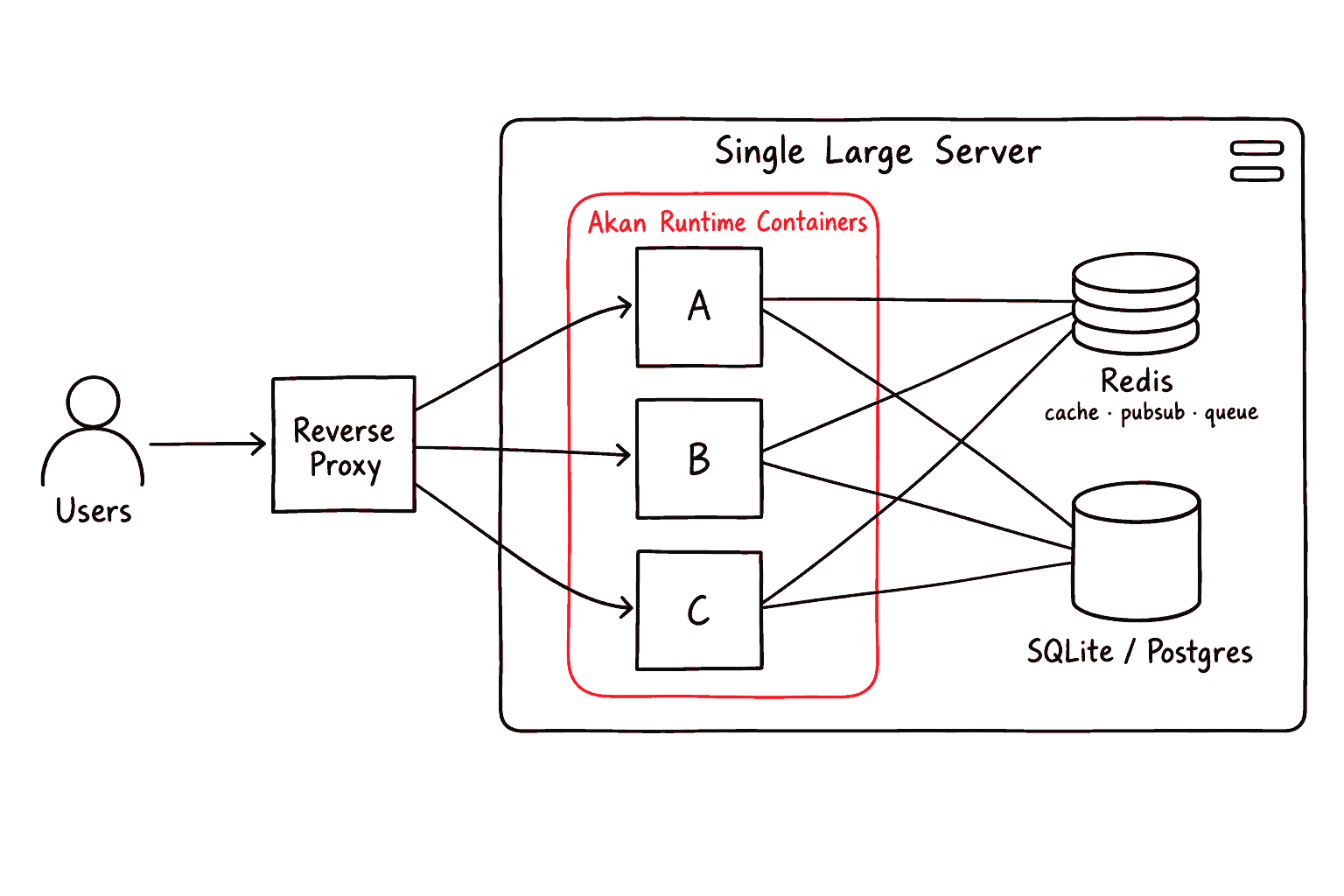
multiple is not a chart mode; it runs on one host with docker compose. Every replica opens the same SQLite file on a host volume and shares one Redis, and a reverse proxy in front balances them:docker-compose.yaml
- The app's build declares multiple. With
multipleindatabase.modes, the image carries the Redis drivers it needs. - Keep the SQLite file on the host's local disk. The
app-datavolume must live on the host's own filesystem, not on NFS. - Uploads share a volume too.
app-filesis mounted at/workspace/localin every replica, whichAKAN_STORAGE_SHAREDdeclares.
Deploying cluster: the Kubernetes chart
The chart in
infra/app runs a branch in cluster when that branch's values say so. Postgres and Redis are yours to run, and the chart reads their URLs from a Secret you create:infra/app/values/myapp-values.yaml
- single is unchanged. It always runs one pod on its SQLite volume, because that ReadWriteOnce volume cannot be mounted by a second pod.
- Tune Postgres in its URL. Pool size, SSL and prepared statements ride the query string:
?max=20&ssl=require, andprepare=falsebehind a PgBouncer in transaction mode.
Uploaded files
A deployed multiple or cluster app runs several instances, and each must read the files the others wrote. Keep uploads in one of two places:
- Object storage. With
libs/util, setobjectStoragein the server env, and every instance reads the same bucket. - One shared volume. Mount it at
/workspace/localon every instance and setAKAN_STORAGE_SHARED=true; the compose file and the chart'ssharedClaimabove do both.
Outside development, an upload to a local disk that only one instance can read is refused.
Moving data between modes
akan db-export writes each model table to its own NDJSON file (one JSON row per line), and akan db-import reads them back into a database. Both run in the mode the shell's AKAN_DATABASE_MODE names, the app's first declared mode by default, and the app must declare it:Terminal
- Rows move exactly as stored. Removed rows come too, and a row whose id already exists is replaced, so an import can be rerun; text search is rebuilt afterwards.
- Sessions, queued jobs and files stay behind. Sessions and jobs live in the cache and the queue, so users sign in again; copy
local/to the shared volume or object storage yourself. - From a deployed single app, copy its SQLite file, point
SQLITE_DATABASE_PATHat the copy, and rundb-export. - Nothing else runs. Both boot the app without listening and without cron or init jobs, and use
local/transferunless--dirnames another directory.
The SQL console on cluster
The SQL console (
runAdminSql) needs no setup on SQLite. On Postgres it reads as its own login role, one that may read base columns and nothing else:- Create the role with
CREATE ROLE <name> LOGIN PASSWORD '…';and grant it no other role. - Set
POSTGRES_INSIGHT_URL(ordatabase.postgres.insightUrl) to a URL that logs in as it. - Each model table grants it its base columns at boot. If the app does not own its schema, the DBA runs
GRANT USAGE ON SCHEMA <schema> TO <name>.
Without the role the console refuses on cluster.
SELECT * returns the base columns, and _doc, which holds every model field including secrets, is never readable.Growth Stages
Infrastructure does not need to start big. A business can begin with one server and one container, then grow step by step as traffic and reliability requirements increase. The three stages at a glance:
| Stage | Servers | Containers | Database mode |
|---|---|---|---|
| 1. Single serverStable | one | one | single |
| 2. Multiple containersBeta | one | several | multiple / cluster |
| 3. Cloud clusterBeta | several | several | cluster |
Stage 1 is stable, and stages 2 and 3 are in beta. Both have a recipe under Database Mode above: docker compose on one host for stage 2, the chart's cluster mode for stage 3.
1. Single serverStable
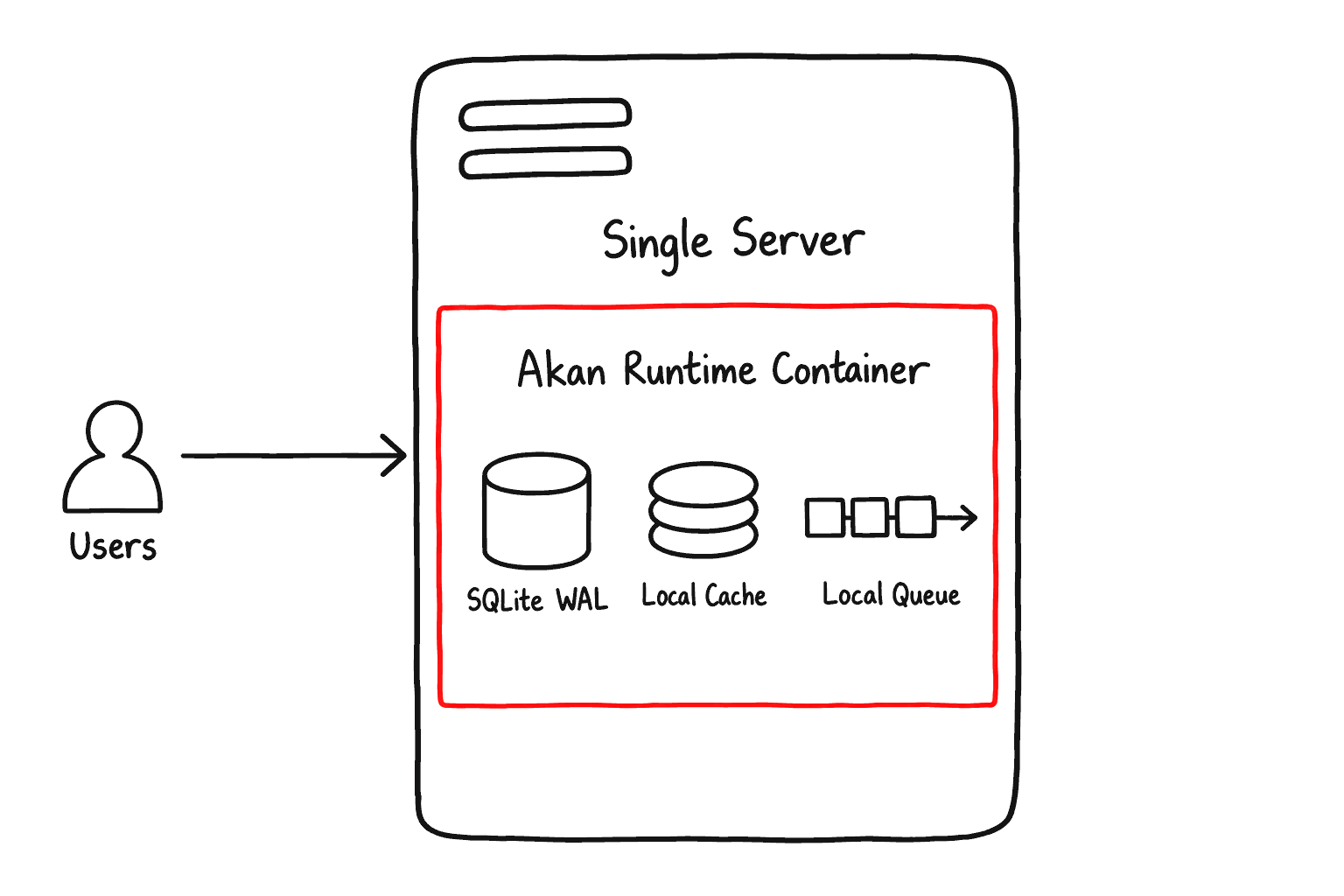
A small product, MVP, internal tool or early admin page runs on one server with one Akan container. That single container serves the database, API, web, CSR, image optimization, cache and queue, and single database mode is usually enough.
The chart asks a debug or develop pod for 0.05 CPU and 250M, capped at 0.5 CPU and 1G.
2. Single server, multiple containersBeta
When traffic grows but one machine is still enough, run multiple containers on the same server. This is vertical scaling: a stronger server, more containers, and multiple or cluster database mode.
You do not need several runtimes for load balancing. One Akan Runtime starts several child servers, as many as the AKAN_REPLICA environment variable sets, and balances load across them. Run several runtimes when you need better stability.
3. Cloud cluster scaleBeta
When one server is no longer enough, move to a cloud cluster. Multiple servers run multiple containers, and cluster mode keeps the database/cache layer closer to production operation.


Postgres and Redis are yours to run. The chart in infra/app reaches this stage when a branch sets
database.mode: cluster, and reads both URLs from a Secret; there is no Redis or Postgres manifest under infra/. In single mode it keeps one pod, because a ReadWriteOnce volume cannot be mounted by a second pod.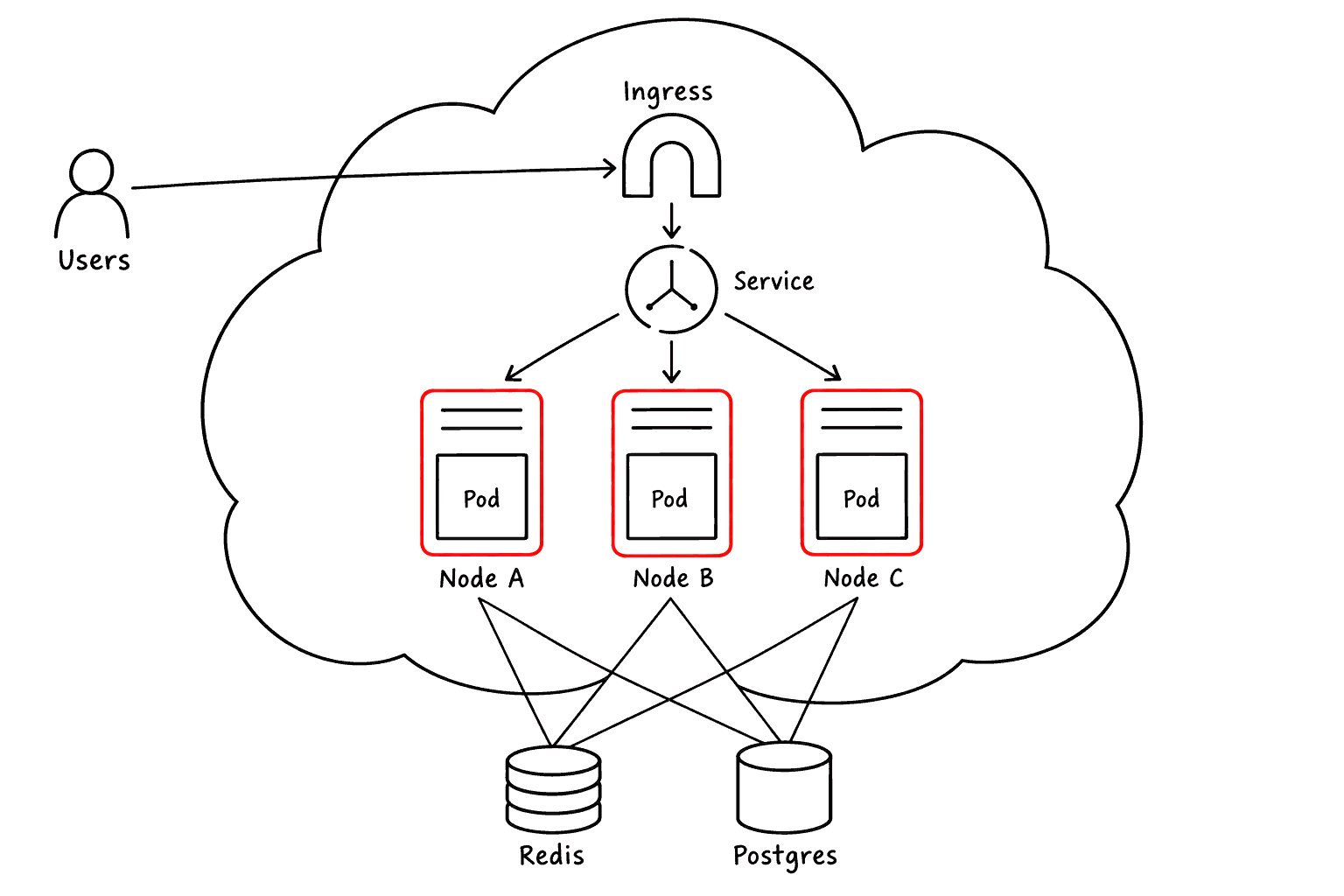
Grow only when the business asks for it. Start small, measure real usage, then move from single server to multiple containers and on to a cloud cluster.