Akan.js
Docs
DocsConventionsReferencesCheatsheet
Akan.js
DocsConventionsReferencesCheatsheet
Akan.js

Released under the MIT License

Official Akan.js Consulting onAkansoftCopyright © 2026 Akan.js All rights reserved.System managed bybassman
YouBothAgent▾
You — Business rules and flows you own. Read these yourself.
Both — Know the idea; your agent follows the details.
Agent — Conventions and references your agent follows. Look up as needed.
Introduction▾
Quick StartFundamentalsPractice
Tutorials▾
Show DetailsModifying StatusInteract in ServiceDisplaying with SliceUX with PagesUsing ScalarUsing InsightRelate Data
Core Concepts▾
Folder RuleFile RuleFile Based RoutingData LayerApp ConfigAkan RuntimeMulti Client
Architecture▾
Architecture OverviewUI ArchitectureUI CompositionBusiness ServiceIn-Page AgentCSS And StylingUI Recipe LayerMobile App ArchitectureRuntime And Infra
YouBothAgent▾
You — Business rules and flows you own. Read these yourself.
Both — Know the idea; your agent follows the details.
Agent — Conventions and references your agent follows. Look up as needed.
Introduction▾
Quick StartFundamentalsPractice
Tutorials▾
Show DetailsModifying StatusInteract in ServiceDisplaying with SliceUX with PagesUsing ScalarUsing InsightRelate Data
Core Concepts▾
Folder RuleFile RuleFile Based RoutingData LayerApp ConfigAkan RuntimeMulti Client
Architecture▾
Architecture OverviewUI ArchitectureUI CompositionBusiness ServiceIn-Page AgentCSS And StylingUI Recipe LayerMobile App ArchitectureRuntime And Infra
PreviousUI ArchitectureNextBusiness Service

UI Composition

Picture an order list screen. Besides the list itself, it needs six more things:
  • a skeleton while it loads
  • a placeholder when it is empty
  • a page control at the bottom
  • a modal for a new order
  • a second modal for editing one
  • a confirmation before anything is deleted
That is six states around one array, and none of them is your product. akanjs/ui ships all six, already wired to the generated store. You write the row and the detail view; the shells around them handle loading, empty, paging, refresh and the CRUD modals.
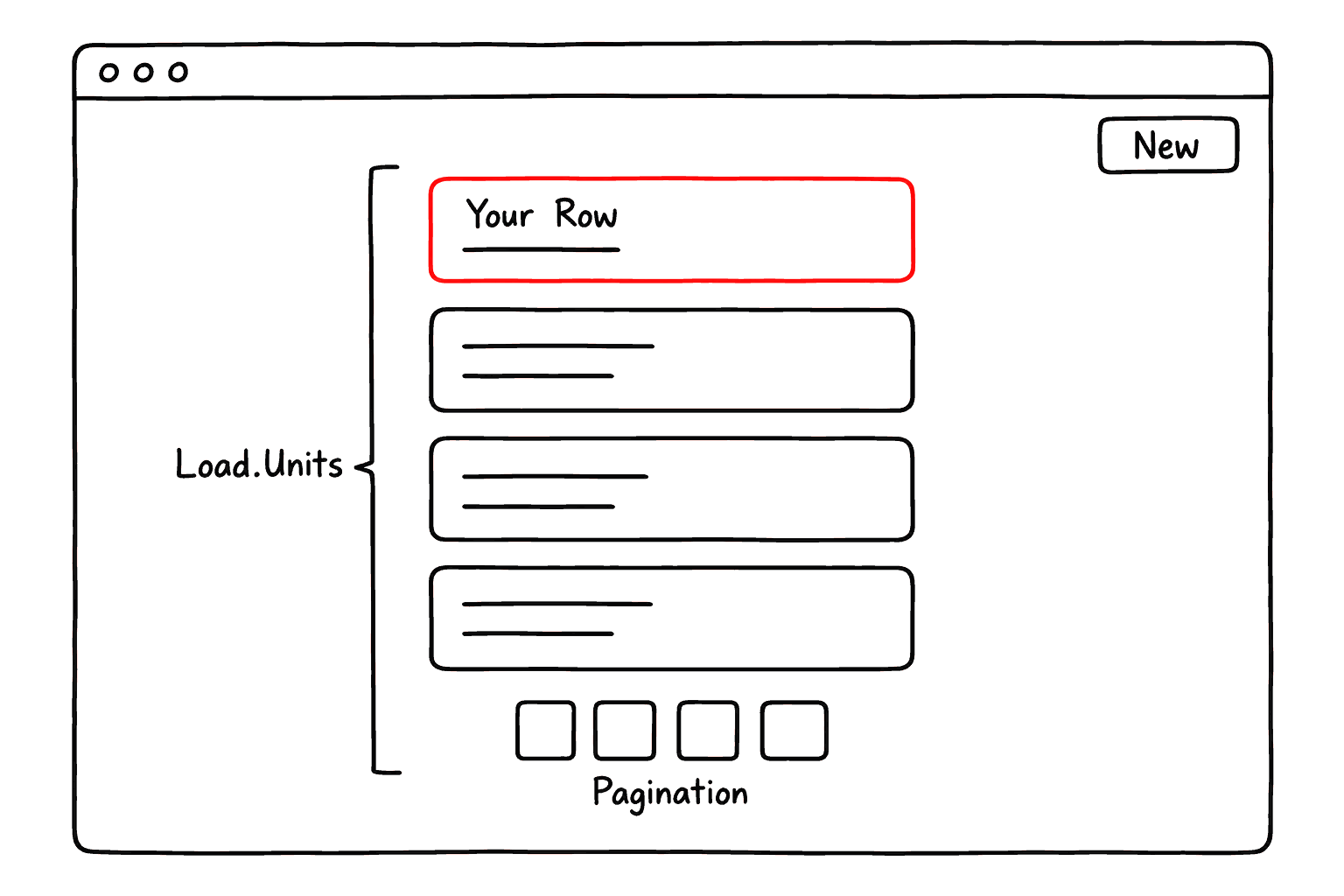
You write the row; the shell draws the rest
On an order list screen you write only one row component. Load.Units repeats it, draws the page control under it and handles loading and empty states; the New button is a Model.New shell.
This page is the inventory of those shells and the rules for combining them. Where the client boundary falls is the subject of UI Architecture.
Words used on this page
TermDescription
shell
A ready-made akanjs/ui component that draws loading, empty, paging or modal states around yours.
slice
A module's named list query, such as icecreamOrderInPublic. A shell takes one as slice.
handle
What fetch.init, fetch.view and fetch.edit return: await it, or destructure one promise per field.
Suspense boundary
A spot that shows a fallback first and streams its content in when the data lands.
What akanjs/ui gives you
ExportDescription
Load.UnitsLoad.ViewLoad.Edit
Data shells: seed the store from a fetch handle and render loading, empty and list states.
Load.Stream
Awaits one promise behind its own Suspense boundary; a resolved value renders inline.
Model.NewModel.EditModel.SureToRemove
Create, edit and remove modals wired to the generated store actions.
Field
The control for every model field type. Never a bare input for a model field.
TabLayoutLinkImageEmpty
Composition primitives. Tab keeps panel bodies on the server; Link adds the locale prefix.
cn
The only class merge, from akanjs/client. Pass the caller's className last.
Where your own components go
What you write splits the same way, by whether it belongs to one model:
lib/<model>/
Anything bound to one model. The module owns its own row, detail view, form and actions.
ui/
Anything reusable across models and bound to none of them.
A component that seems to need both is really two components: one in each place.
Reach third-party packages through a lib. A third-party package may not be imported from page/**, from a barrel, or from any module component file; re-export it through a lib first. That is why libs/shared/ui/Field.tsx extends the framework Field with Rich, Img and Map instead of each app importing an editor directly.

The Shape Of A Model Screen

A model almost always produces the same four screens. Users scan a list, create a record, open one, and come back to edit it. Each arrow below is a shell that already exists, so the four screens are four small files rather than four workflows.
Index, new, view, edit
Start
IndexLoad.Units
NewModel.New
ViewLoad.View
EditLoad.Edit
End
new
submit
pick a Unit
edit
submit
back
Model.SureToRemove
Start
IndexLoad.Units
NewModel.New
ViewLoad.View
EditLoad.Edit
End
Start → Index
Index → Newnew
New → Viewsubmit
Index → Viewpick a Unit
View → Edit
Each screen has one job, and one shell that does the heavy lifting:
Index — find one
Load.Units
For discovery: search, scan, page through and choose a record.
New — create one
Model.New
Controlled input through one Template and a submit action.
View — read one
Load.View
Presents one record clearly, then offers the follow-up actions.
Edit — change one
Load.Edit
The same Template as New, with the record's current values in it.
The same stack under every screen
Underneath all four screens, the same layers run in the same order, from the route down to the database:
From the route to the database
page()route entry
Unit · Viewserver components
Zone · Template · Utilclient components
Two roads to fetch, one rule. The route calls fetch directly; a client component reaches it only through a store action. That one rule keeps the two paths from drifting apart.
Day to day, four generated helpers are the whole surface you touch:
HelperDescription
fetch
One call per endpoint, plus per-slice init, view and edit handles. Called server-side.
st
Read with st.use.*, write with st.do.*. The CRUD actions are generated.
<Model>.*
A module's Unit, View, Zone, Template and Util. Name by role: IcecreamOrder.Unit.Card.
usePage
l, l.trans and the page context. Works in a server component.

The Load Shells

Never hand-roll a loading, empty or list state. A Load shell does three things for you:
  • It takes the handle the route fetched, so the data is already on its way before the page is sent.
  • It seeds the client store from that handle, so the generated pagination, query, sort and refresh actions keep working after hydration.
  • It renders the loading, empty and list states around your row component.
ShellDescription
Load.Units
init from fetch.init<Model><Suffix>. renderItem draws a row; renderList takes the whole list.
Load.View
view from fetch.view<Model>. renderView is required; empty is the placeholder.
Load.Edit
edit from fetch.edit<Model>, or a partial. slice is required; type picks modal or form.
Load.Stream
of takes a promise or a value; children renders it. Takes a slice's x<Model>List<Suffix>.
Load.PaginationLoad.Page
The paging control alone, and the shared SSR/CSR page loader.
Don't wait for the slowest query
The route destructures the handle instead of awaiting it. The init field goes to a Zone, and any leftover list promise goes to a Load.Stream:
apps/koyo/page/(public)/icecreamOrder/_index.tsx
  • Load.Stream shows the skeleton until the list lands, then renders the total from it.
  • The Zone receives init and renders the rows behind a boundary of its own.
  • Each renders as its own data lands, so the page never waits for the slowest query.

The CRUD Modals

Creating, editing and removing a record are three workflows every model needs and no model should implement. Each shell takes the slice it operates on, opens the module's own Template, and calls the generated store action on submit.
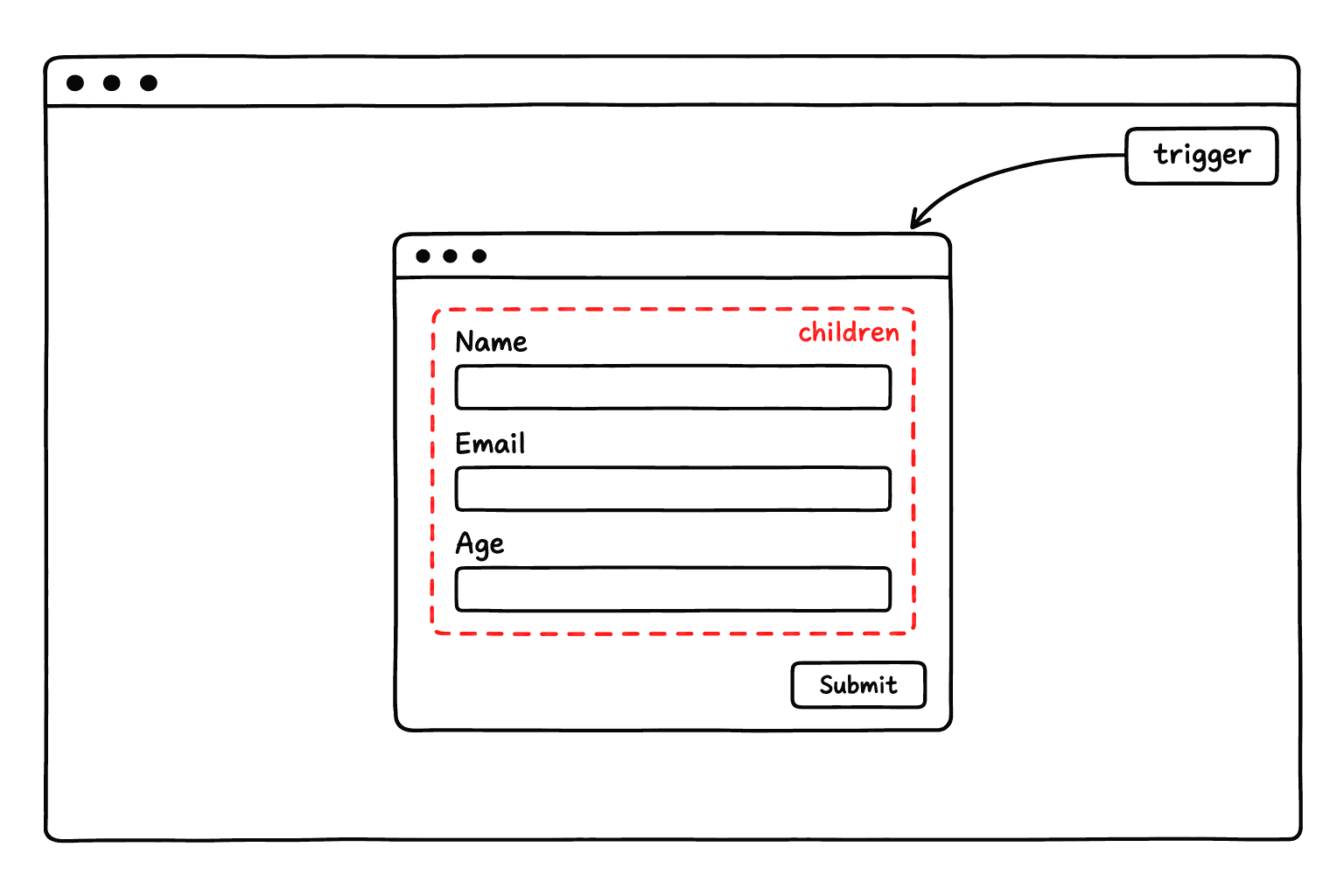
Model.New: the trigger opens it, children fill it
The trigger prop is the button on the page that opens the modal. The children of Model.New are the form fields inside the modal, not the button's label; the modal itself and its submit button come from the shell.
apps/koyo/lib/icecreamOrder/IcecreamOrder.Util.tsx
A Util export is named for the endpoint verb minus the model noun, so this file exports New and Remove rather than NewIcecreamOrder. Three props are worth knowing before you reach for one of these shells:

Forms Are Store-Driven

A Template, the module's form component, holds no state of its own. Every control reads one key of <model>Form from the store and writes it back through the generated setter. Two things follow from that:
  • A Template contains zero useState.
  • A saved draft can be restored into it, because the whole form lives in one place.
apps/koyo/lib/icecreamOrder/IcecreamOrder.Template.tsx

One Vocabulary, Many Screens

Every string a user reads goes through the module's dictionary. Field labels, enum values, error messages and the model's own name are declared once as [en, ko] pairs, and components read them by key.
That way the vocabulary lives next to the model, not scattered through whichever components happen to display it.
apps/koyo/lib/icecreamOrder/icecreamOrder.dictionary.ts
A component then reads text in one of three ways:
CallDescription
l("icecreamOrder.size")
A field label, read from the model's dictionary.

On this page

UI Composition
The Shape Of A Model Screen
The Load Shells
The CRUD Modals
Forms Are Store-Driven
One Vocabulary, Many Screens
trigger
Replaces the default button that opens the modal. On Model.New and Model.Edit, children is the form body handed to the modal, not the label, and neither takes a className. Model.SureToRemove takes no children at all, so its trigger is the whole control.
draft
Form recovery, on by default. The shell saves the whole form as the user types and offers it back on the next open. The scope is the record id for an edit and the seed plus the route for a new form, per signed-in user. Secret and hidden values are never saved.
name
Model.SureToRemove shows this in the confirmation. With typeNameToRemove, the user must also type it back before the delete button enables.
Never persist form values yourself. The old per-field cache and cacheKey props are deprecated and store nothing: they covered five control types, keyed on the translated label, and restored over server data. draft={false} turns recovery off, and draft="<scope>" names the scope when the context is in neither the id nor the seed.
Pass the setter by reference. onChange={(v) => st.do.setSizeOnIcecreamOrder(v)} runs identically, but the arrow is a fresh anonymous closure. The control then emits no data-akan-action and publishes no agent tool for that field, so the in-page agent, E2E selectors and any external browser agent quietly lose it. To normalize a value, use the control's transform prop instead.
Nested rows and files
Nested rows
Write one nested value by its path, and add or remove rows with the generated add<Field>OnX and sub<Field>OnX actions.
st.do.writeOnIcecreamOrder("toppings.3.name", value)
Image and file fields
An image or file field is a relation to the File model, and the store generates its upload action. Never hand-roll a data-URL fallback.
upload<Field>On<Model>(fileList)
What a store action does, and doesn't
Does
  • Read state and call fetch.
  • Update the loading, list and form state.
  • Write any result into state with this.set({ ... }).
Doesn't
  • Return a value. Every action dispatches through st.do.<action>() and is typed void, so nothing can reach it.
  • Catch errors. The framework toasts the Err for you.
  • Repeat business rules. Password, permission, stock and payment rules stay in the service.
l("icecreamOrder.modelName")
The model's own name.
l.trans({ en, ko })
A one-off sentence that belongs to no model.
usePage() resolves all three on both the server and the client, so a fully localized screen never needs a client boundary for its text.
That same vocabulary, the same fetch and the same store back a customer web site, an admin console, a partner portal and a mobile app — those are client surfaces of one app, not separate apps, and which one a screen belongs to is a product decision before it is an infrastructure one. Multi Client covers how a basePath gives each surface its own routes, layout and permissions.
edit
Edit → Viewsubmit
View → Indexback
View → EndModel.SureToRemove
store
st.use · st.do
fetchgenerated endpoint calls
signalendpoint · slice
service
document
page()route entry
Unit · Viewserver components
Zone · Template · Utilclient components
storest.use · st.do
fetchgenerated endpoint calls
signalendpoint · slice
service
document
A list or insight never goes to a Zone. x<Model>List<Suffix> and x<Model>Insight<Suffix> resolve to hydrated model instances: class objects with methods. React Flight, the format the server uses to hand props to client components, refuses them. Consume them in a server component or inside a Load.Stream. The init field is the one shaped for the boundary.
Never call fetch.init* from a client file. From a route it resolves before the first byte; after hydration it is two extra round-trips for a shell the browser already painted. To reload from the client, use the generated st.do.init<Model><Suffix>().