Data Layer
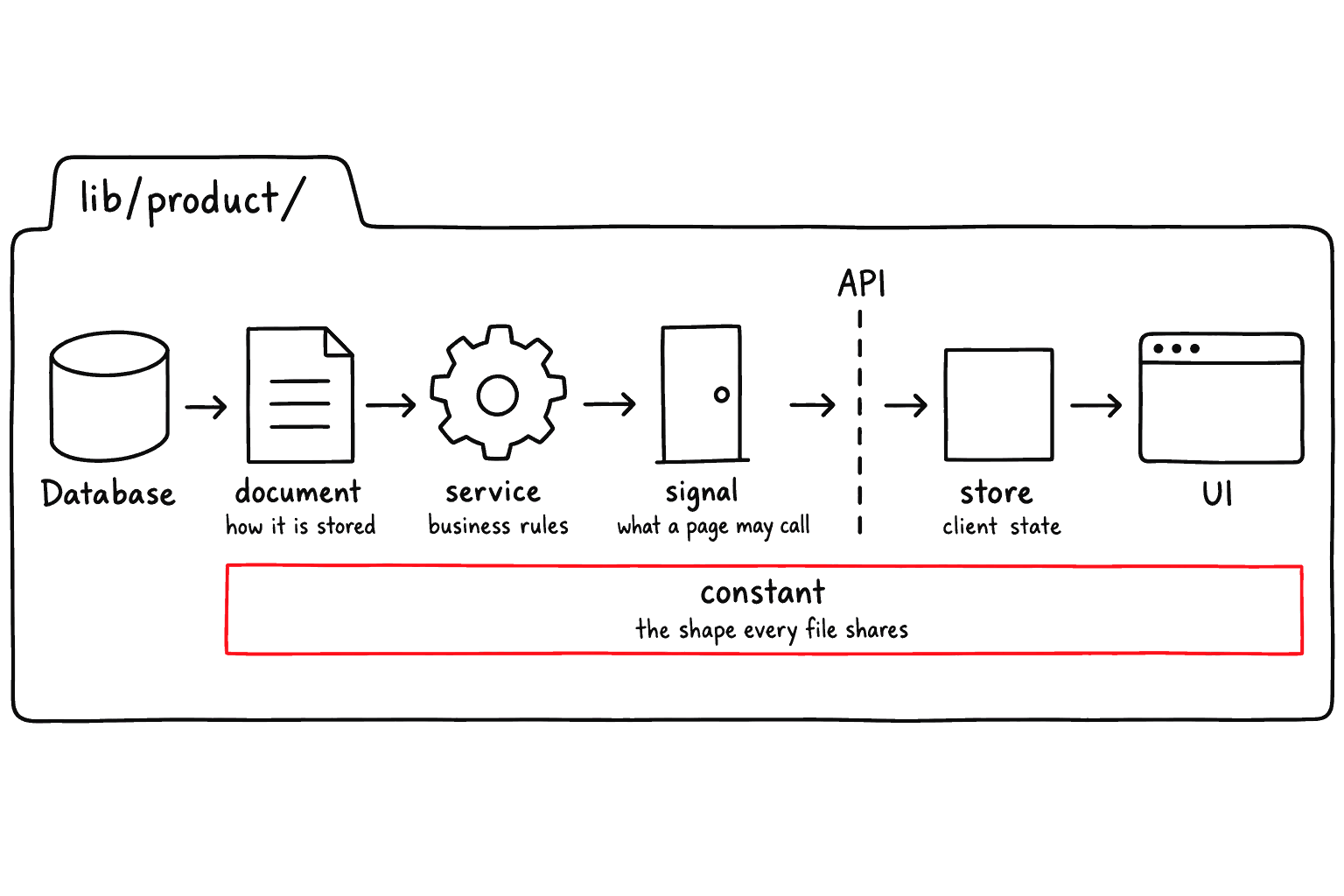
The data layer is the path from business data definition to server logic and screen usage. If you are building products, orders, users, reservations, or invoices, this is where the business shape becomes real application behavior.
Akan keeps this flow close to the model folder. For example, a product feature can define what a product is, how it is stored, how stock and price rules work, and how pages load product data from one module.
Model Shape
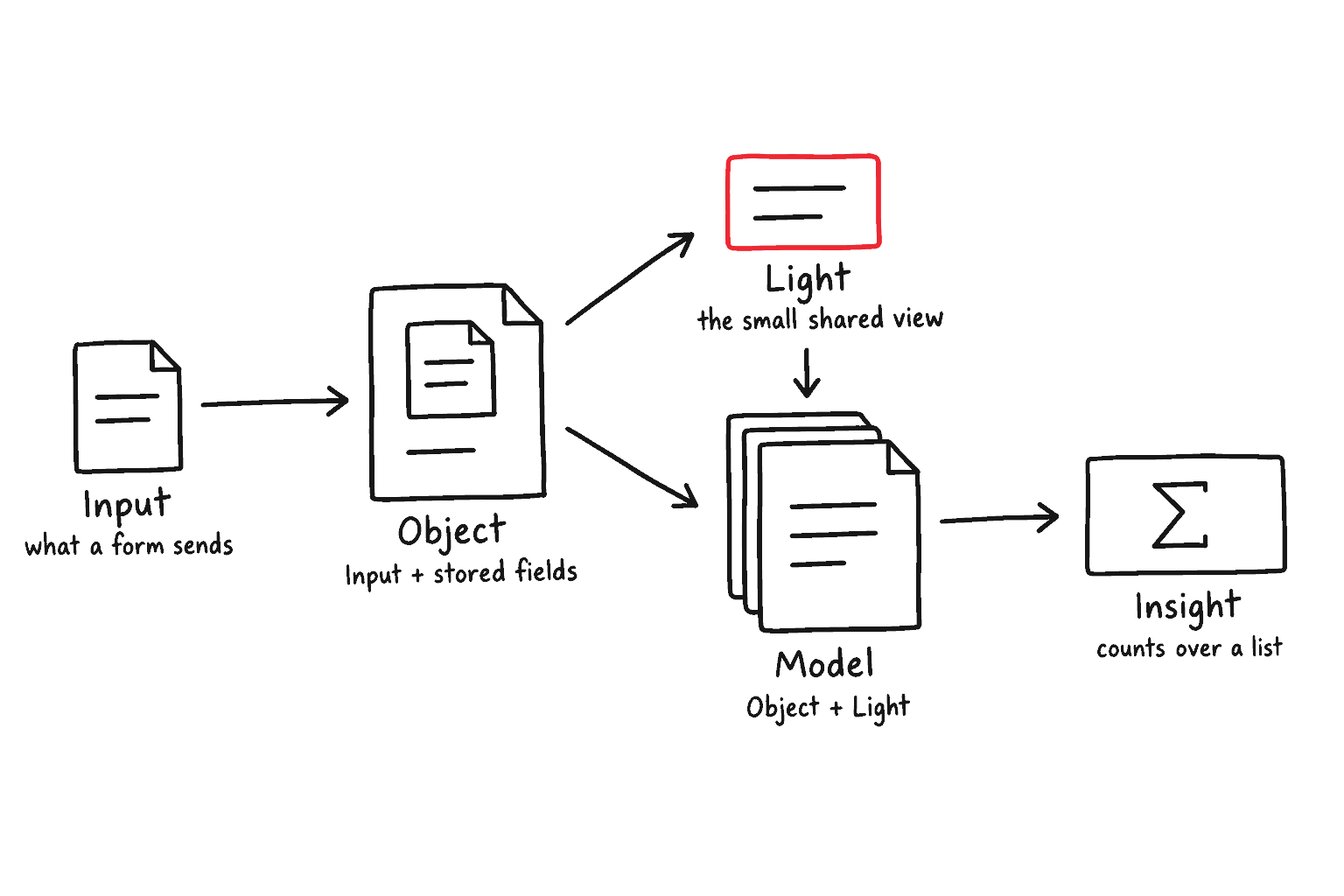
The constant file is the design sheet of a business object. It answers questions such as: What fields does a product have? Which values are allowed? Which fields should be shown in a lightweight list?
In the product example, the model keeps catalog information such as name, description, image URL, price, stock, and sale status. This is the shared source that the server and client can both understand.
apps/shop/lib/product/product.constant.ts
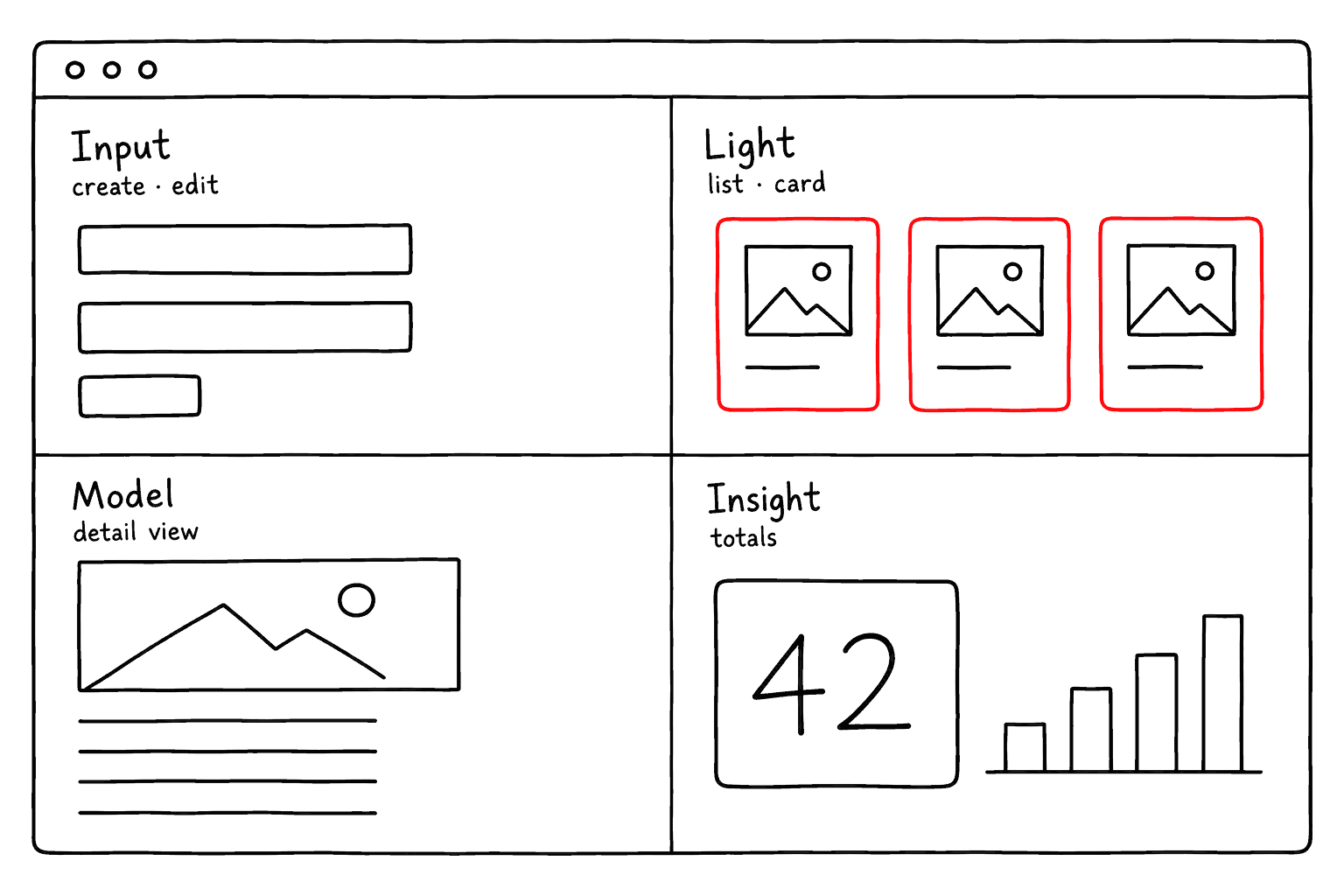
Input: Fields that can be submitted when creating or updating data.
Object: The base object shape used to build other model views.
Light: A smaller view for lists, cards, and embedded references.
Full: The whole record, returned by a detail query. Write all five classes, in this order, in every constant file.
Insight: Aggregate numbers a list query reports alongside the rows. Declare it even when it is empty.
Document And Service
The document file turns the model shape into stored data. It defines the database-facing model and the filter shape used when the application searches or sorts records.
apps/shop/lib/product/product.document.ts
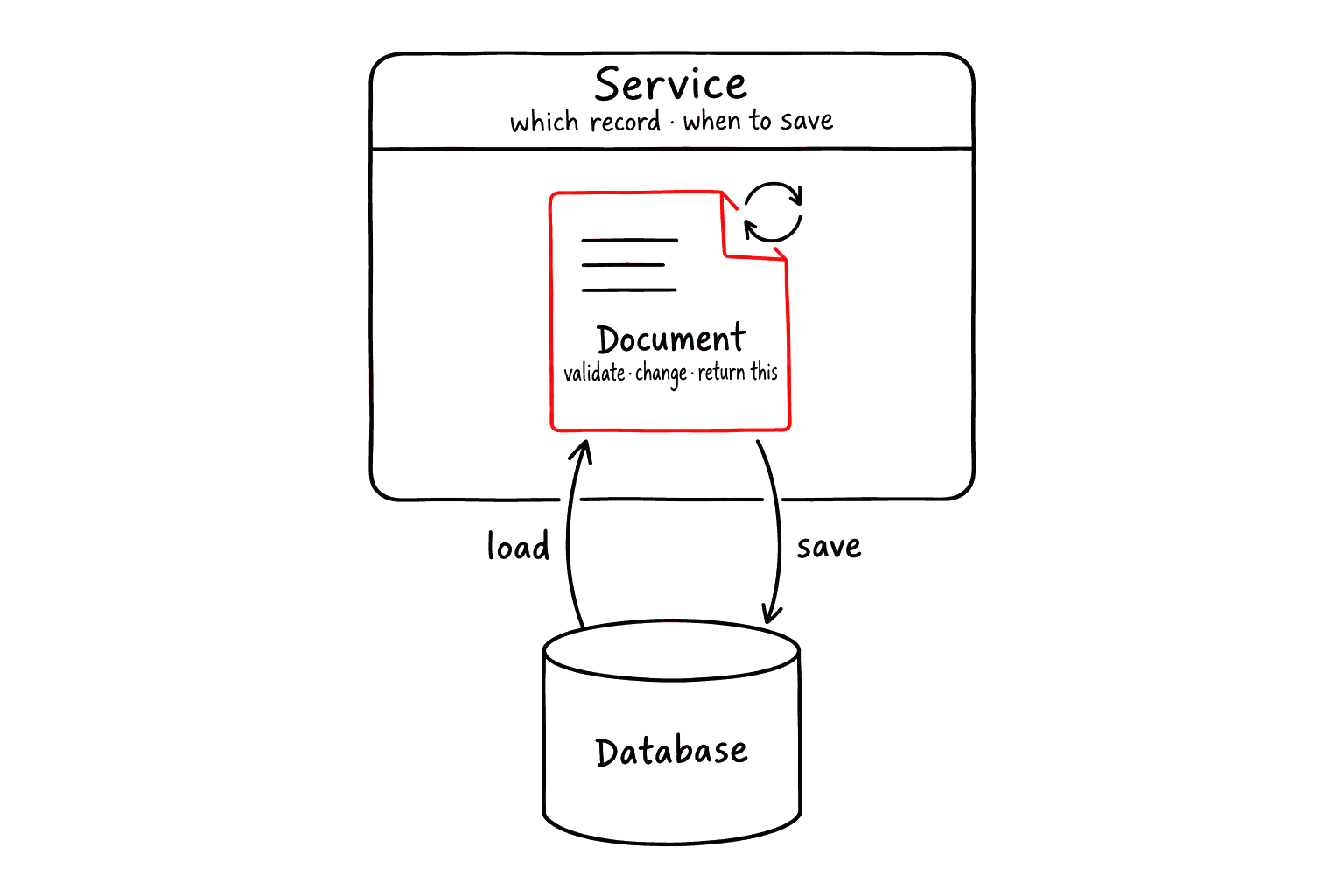
The service file is where business behavior lives. In this simple example, the document knows how to increase its own stock, and the service decides which product should be loaded and saved.
apps/shop/lib/product/product.service.ts
What A Filter Generates
A query you declare in the document file is not one method. Akan generates fourteen from it, named after the filter key: declare byOwner and you have listByOwner, countByOwner, updateOneByOwner, and eleven more, on both the model and the service.
apps/shop/lib/product/product.document.ts
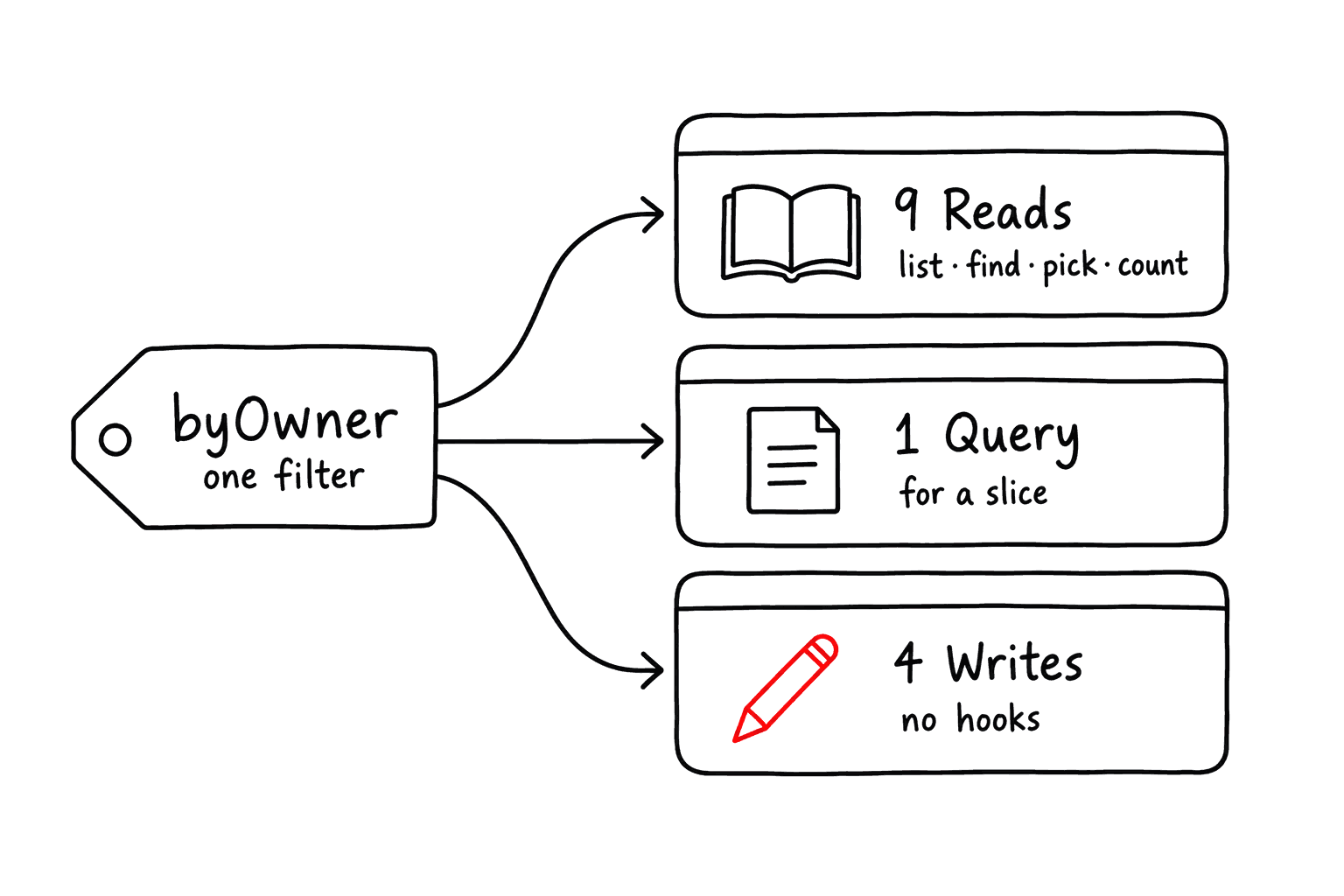
Nine of the fourteen read, one only builds a query descriptor, and the remaining four write. Those four are the ones to be careful with: each is a single atomic statement against the database, so none of the model's document hooks run:
MethodDescription
list<Filter>
Read, no hooks. Hydrated documents, newest first; takes skip, limit, sort and select.
listIds<Filter>
Read, no hooks. Just the ids; the same option, minus select.
find<Filter>
Read, no hooks. The newest match or null.
findId<Filter>
Read, no hooks. That match's id, or null.
pick<Filter>
Read, no hooks. Like find, but no match throws — for rows the caller knows exist.
pickId<Filter>
Read, no hooks. That id, or a throw.
exists<Filter>
Read, no hooks. The matching id or null — not a boolean, though it works in a condition.
count<Filter>
Read, no hooks. How many rows match.
insight<Filter>
Read, no hooks. The model's Insight aggregate as a plain record, not a hydrated document.
query<Filter>
Neither. The descriptor a slice's exec returns; synchronous, never touches the database.
remove<Filter>
Write, NO hooks. One atomic soft delete over every match, reporting counts.
removeOne<Filter>
Write, NO hooks. The same on the newest match; for at-most-one rows, not queue claims.
update<Filter>
Write, NO hooks. A chain: the patch goes on a terminal .set(); building it does nothing.
updateOne<Filter>
Write, NO hooks. The same chain, narrowed to the newest match.


Reach for the four writes only on a model whose removal carries no side effect. A model with a cascade, a _postRemove that deletes a stored file, or a live list watching it must be removed one document at a time through remove<Model>(id) — one atomic UPDATE cannot run any of that.
Every model already carries an any filter, so listAny and countAny exist before you declare anything.
Signal To UI
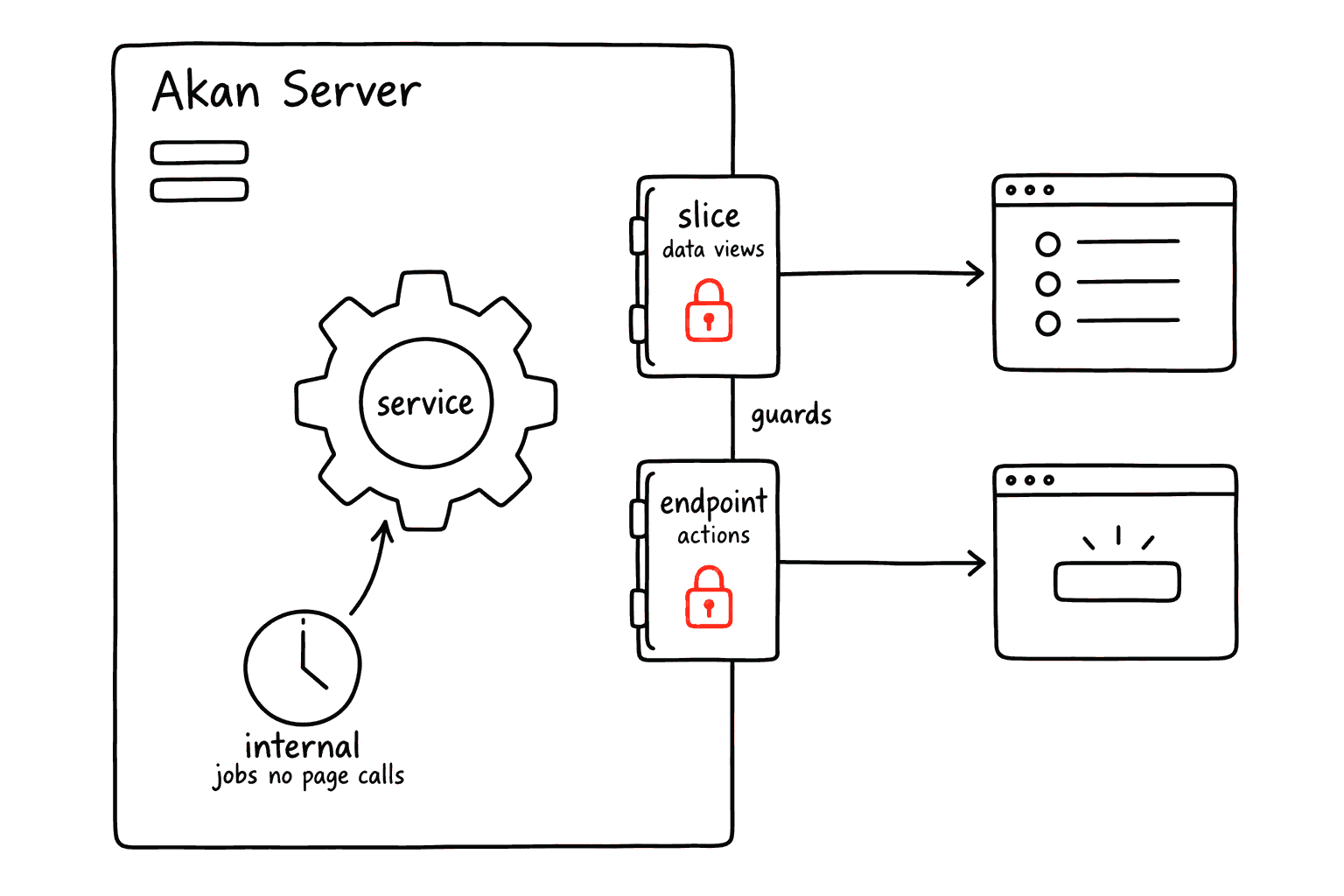
Signal is the layer that makes server behavior available to pages. A slice is useful when the page needs a list or dashboard view. An endpoint is useful when the page needs to run a specific action, such as adding product stock.
apps/shop/lib/product/product.signal.ts
Every custom endpoint names its own guards array, and the slice names one per verb. The guards are also the MCP exposure decision: an endpoint that declares none is refused from the agent catalogue, so a missing guards array costs visibility as well as authorization.
slice: Use it for data views such as public list, admin list, dashboard, or search result.
endpoint: Use it for actions such as cancel order, approve request, send message, or complete payment.
internal: Use it for server-side jobs such as schedules, intervals, queues, or maintenance work.
Fetch And Store Instances
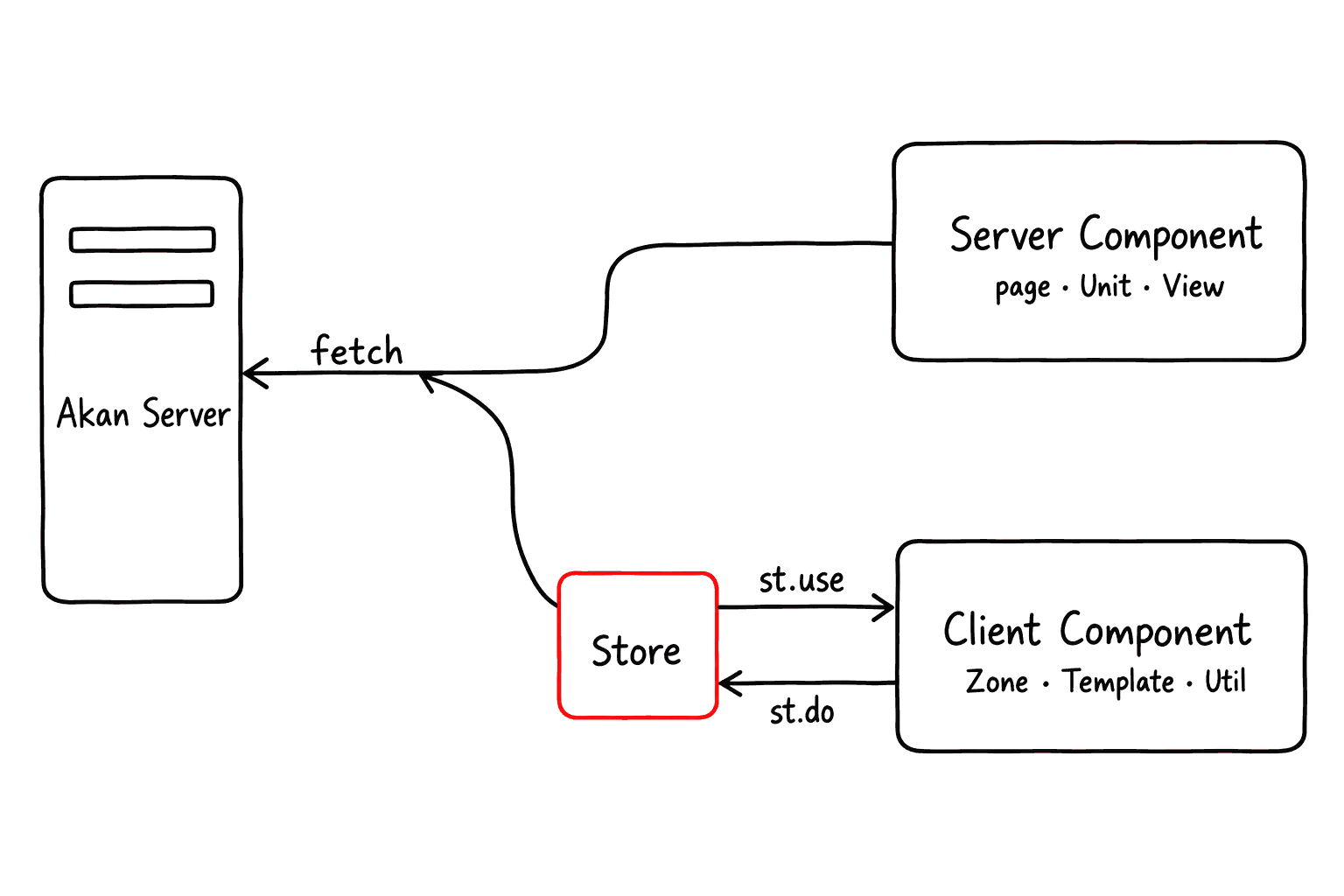
After signal is declared, Akan exposes app-specific client helpers from @apps/<app>/client. The two names you will see most often are fetch and st.
Use fetch when you need to call server data or pass slice metadata into Akan UI components. Use st when a client component needs to read current state or run a store action.
fetch: Generated request instance. It calls endpoints, initializes slices, loads views, and exposes fetch.slice.* metadata.
st: Generated client store instance. It provides st.use.* hooks for reading state and st.do.* actions for changing state.
Server action: call addStock with fetch
Endpoint arguments are positional and in declaration order, and the call resolves to whatever the endpoint returns. addStock returns cnst.Product, so the awaited value is the product itself, not a wrapper object.
This pattern is useful when a page, action, or server-side helper needs to run a business operation. The generated fetch instance calls the server endpoint and returns the typed result.
Client zone: pass fetch.slice metadata to UI components
fetch.slice.product is not the product data itself. It is slice metadata that tells Akan UI components which model slice should be viewed, edited, refreshed, or removed.
Client form: read and change state with st
In client components, st.use.* reads the current store value and st.do.* runs the generated action. This keeps form state and business actions consistent across screens.
st is for client components. If a component uses st.use.* or st.do.*, mark it with "use client". Server pages should usually load initial data with fetch instead.
Streaming Page Data
fetch.init<Model><Suffix>, fetch.view<Model>, and fetch.edit<Model> are the three helpers a route uses to load a screen. Each returns a handle that is awaitable and destructurable at the same time: awaiting it gives the payload object, while reading a field off it gives that field's own promise.
The difference is where the page waits. An awaited call holds the whole route until the query lands, so nothing below it is sent. A promise handed to a Zone or to Load.Stream is awaited inside that component instead, behind a Suspense boundary of its own — the rest of the page is already on the wire, and each section fills in as its own data arrives.
Where the page waits
Browser
Route render
Server queries
GET /:lang/shop/:shopId
fetch.initProductInShop(shopId)
fetch.initOrderInShop(shopId)
shell HTML, one boundary per section
productInitInShop fills the product zone
orderInitInShop fills the order zone
productListInShop fills the Load.Stream
Server page: hand each promise to the section that renders it
x<Model>Init<Suffix>: Plain list and insight data. This is the one field that may cross into a client Zone as a prop.
x<Model>List<Suffix> / x<Model>Insight<Suffix>: Hydrated model instances, which React Flight refuses as client props. Consume them in a server component or a Load.Stream.
x<Model>View / x<Model>Edit: The single-model payloads for Load.View and Load.Edit. The sibling x<Model> field is the hydrated model, so it is server-only for the same reason.
Await what the page needs immediately and stream the rest. The shell is what SEO snapshots, prerendering, and pre-hydration E2E read, so a value the first screen depends on — an auth gate, a title, an id used to build a link — belongs in an awaited call.
Common Decisions
When you are not sure where to put code, start with the business question. The data layer is easier to design when each file answers one kind of question.
QuestionDescription
What fields does it have?
model.constant.tsWhich fields are text searchable?
model.constant.tsHow is it stored, filtered, or searched?
model.document.tsWhat business rule should run?
model.service.tsWhat should a page call, and who may call it?
model.signal.tsWhat state is shared on the client?
model.store.tsWhat should users see?
Model.View.tsx · Model.Zone.tsxKeep page files focused on user experience. If the rule would still matter when another page, mobile app, or admin screen uses the same feature, it usually belongs in the data layer.