Architecture Overview
Why does one product need a frontend repository, a backend repository, a mobile project, and an infra chart before a customer can place a single order? Akan starts from the behavior instead. A customer sees a screen, takes an action, business rules decide what should happen, data changes, other clients may be notified, and the same app is packaged for web, mobile, cloud, or edge.
This page is the map, not the territory. Each area below owns a different kind of decision, and the product stays legible as long as those decisions stay where they belong. Three rules hold across all of them:
Behavior First
Write business behavior first, then let generated helpers reduce API and state glue.
One Service, Many Clients
One business service layer serves every client surface: SSR web, CSR web, admin, partner, and mobile.
Deploy Later
Choose the deployment shape after the product needs it: local first, then cloud, edge, or hybrid.
One App, Many Surfaces
Akan is designed for products that rarely have only one screen. A store customer page, an admin console, a partner client, a mobile app, and an edge device workflow present different interfaces while sharing the same rules and the same data.
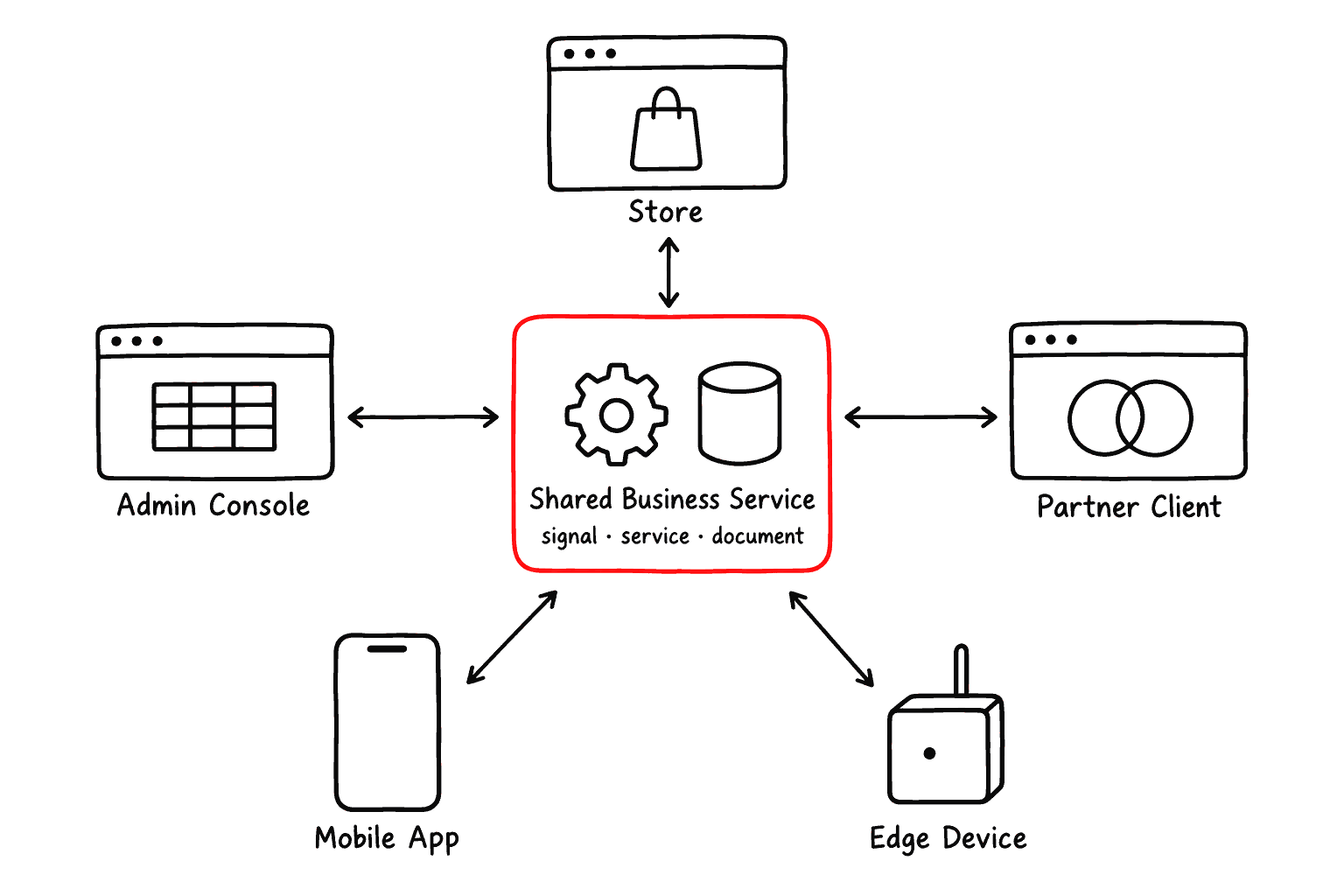


The point is not to force every client to look the same. The point is to let different clients reuse the same business truth while presenting the right workflow for each audience.
The Main Runtime Conversation
Almost every Akan feature is one conversation between the interface and the business service. The interface shows useful content and captures intent; the business service receives a safe request, decides the rule, changes data, and may trigger background or realtime follow-up work.
One request, end to end
User
ScreenPage and clientcomponents
Helpersfetch · st · Model· usePage
signal
service
document
reads the SSR first view,
then types, clicks, filters
intent
fetch.endpoint(args)
valid work only
load and write
documents
result
typed response
st state
re-render
endpoint · slice · internal — guards and boundaries run here
rules · external APIs · DI · background · realtime
schema · query · sort · methods · statics
SSR is what makes the first view appear early; client components take over for typing, clicking, filtering, chat, maps, camera, and local state. st holds the client state a response lands in, Model namespaces keep model usage typed, and usePage resolves i18n on both sides. Where that conversation actually executes — one process, a cloud cluster, an edge node, or a mobile package — is a runtime and infra decision, not a change to any of the code above.
Architecture Areas
The detailed architecture pages explain each area more deeply. This overview keeps the map small: each area owns a different kind of decision, and the product becomes clear when those decisions stay in the right place.
UI Architecture→
Design the first screen and decide what runs on the client.
UI Composition→
Build a list, a detail view, or a create and edit form.
Business Service→
Write server rules, APIs, queues, cron, and realtime work.
Runtime And Infra→
Choose local, cloud, edge, database, and deployment shape.
Native App Architecture→
Package the CSR client as an iOS, Android or desktop app.
CSS And Styling→
Set theme tokens, fonts, and consistent component style.
UI Recipe Layer→
Stop re-implementing the same card or button look.
In-Page Agent→
Let an AI agent read and drive a screen.
You do not need to read every architecture page before building. Start from the decision you are facing, then move to the page that owns that decision.