UI Architecture
Every component in an Akan app runs in one of two places. A server component runs once on the server and reaches the browser as finished HTML. A client component — a file that starts with "use client" — reaches the browser as HTML too, but then its JavaScript follows, and the browser runs it again before its buttons and inputs work.
This page is about deciding which of the two each piece of a screen should be. The mistake it exists to prevent looks like this: one button in a file needs an onClick, so "use client" goes on top. The file is two hundred lines of product markup and one handler, and now all two hundred lines ship twice.
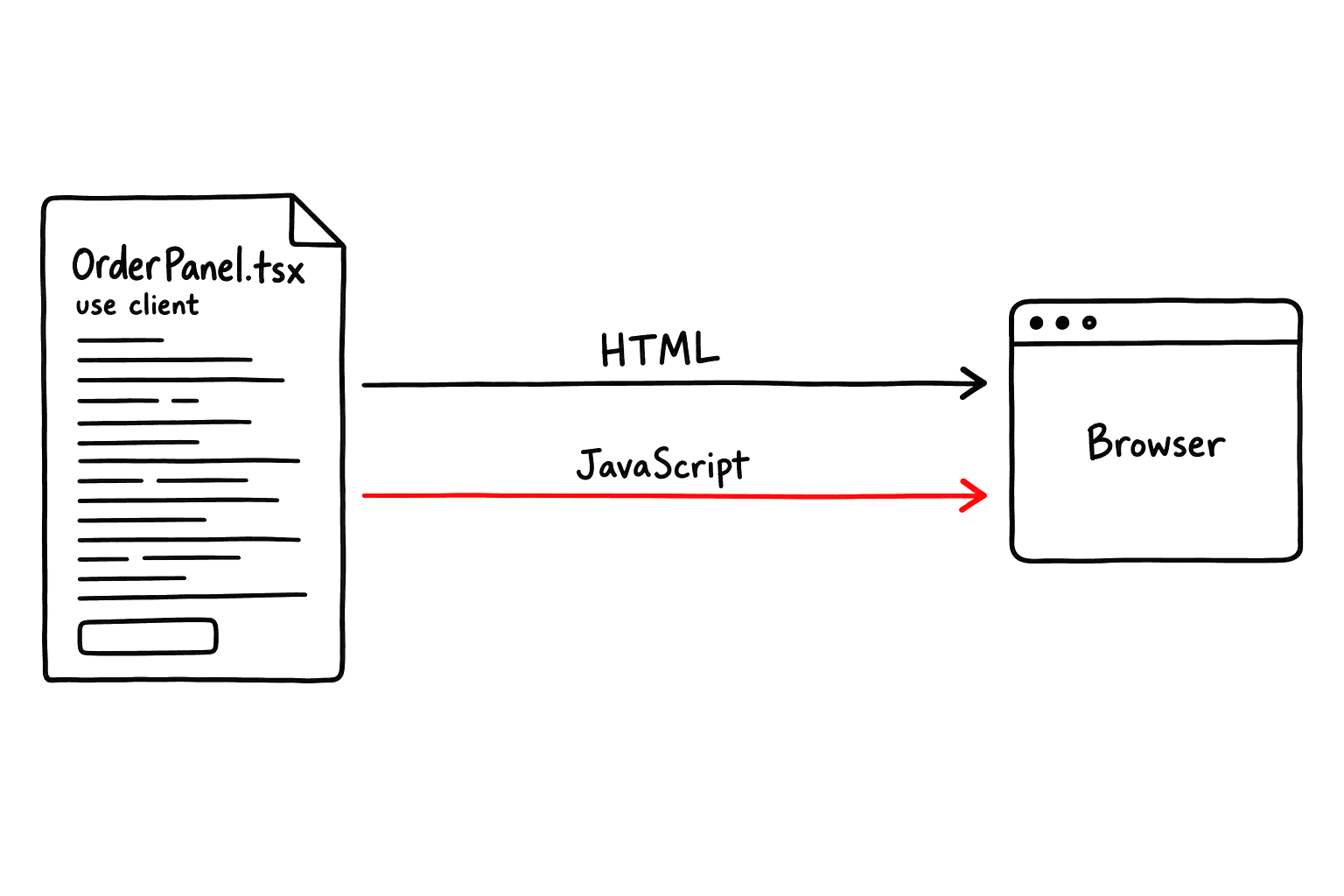
That is why Akan is SSR-first. Server is the default, and "use client" is a cost you justify for each component rather than a habit. The good news is that the line is mostly mechanical: the sections below show which features need the browser, how domain files decide for you, and how to measure where your app stands.
Words used on this page
TermDescription
server component
Runs once on the server and arrives as HTML. None of its JavaScript reaches the browser.
client component
A file that starts with "use client". It arrives as HTML, then again as JavaScript in the bundle.
hydrate
The browser re-runs a client component's JavaScript so the HTML on screen responds to input.
shell
The first HTML the server sends. What the page awaited is in it; streamed sections follow.
island
One hydrated client component inside HTML the server rendered.


akan quality ssr prints each app's and lib's server render share: the portion of JSX elements rendered on the server. 50% is the floor, and a falling share is a regression. If a change moves markup to the client, say why, or move it back.How A Page Reaches The Browser
Server-side rendering means the server builds the first HTML before the browser has loaded the app. A customer can already read the order list, the prices and the policy text while the filter and the submit button are still on their way.
One request, end to end
User
Browser
page().render()
fetch.init and fetch.view
Akan server
opens /en/icecreamOrder
request
fetch.initIcecreamOrderInPublic()
slice query
init payload
shell HTML, server components already rendered
each section streams in as its own promise lands
hydrate the client islands only
the user can read the page here
the user can now type and click
Reading and interacting do not have to start at the same moment, so it helps to think of them as two separate clocks:
Time to View
When the page becomes readable
How soon the user can read something meaningful: titles, sizes, prices, the first rows. Server rendering is what moves this.
Time to Interaction
When the page responds to input
How soon the user can type, click or filter. Only hydrated islands move this, and every element you keep on the server makes them smaller.
Send the shell first, stream the rest
A page does not have to wait for every query before it sends anything. fetch.init<Model><Suffix>, fetch.view<Model> and fetch.edit<Model> can be used in two ways, and the choice decides where the data lands:
await — part of the shell
await fetch.initXInY(id)The shell waits for the data, so it is in the first HTML. SEO snapshots, prerendering and pre-hydration E2E read exactly this. Use it for what the page needs immediately.
destructure — streamed
const { xInitInY } = fetch.initXInY(id)You get one promise per field, with the queries already running. The shell goes out at once, and each section fills in when its own promise lands. Use it for the rest.
In the page below, the heading goes out right away and the order list streams in behind it:
apps/koyo/page/(public)/icecreamOrder/_index.tsx
- The heading is server markup. It is already on the wire while the slice query is still running.
- The Zone is the only part that hydrates. It receives the unawaited promise, not the data, so nothing above it waits.
- A promise that no Zone consumes goes to a Load.Stream instead. The UI Composition page covers it.
What Earns A Client Component
Only five kinds of feature actually need the browser. A component that uses none of them belongs on the server, even when it sits right next to one that does. akan quality ssr applies this same list when it checks whether a "use client" was needed.
What the code uses
Server
Client
The five that need the browser
useState · useEffect
✓
React runs hooks in the browser.
usePage(), getSelf() and useServer() are the exceptions and work on the server.onClick · onChange
✓
An event handler has to be in the browser to catch the click, so its component goes there too.
st.use · st.do
✓
The store lives only in the client bundle. Importing
st means the file needs "use client".window · document · localStorage
✓
Browser globals and APIs such as
matchMedia and WebSocket do not exist on the server.client-only package
✓
A map, editor or chart that touches the DOM when imported. Reach it through a lib re-export.
Everything else is server work
markup and lists
✓
Cards drawn from an array are plain HTML with nothing to hydrate.
usePage · l · l.trans
✓
Translation works on the server too, so localized text never needs
"use client"..param · .search
✓
Route values arrive typed in the render callback before the first byte is sent.
fetch.*
✓
Called in a route, it finishes before the first byte. From a mounted client it costs two extra round-trips.
getSelf({ unauthorize })
✓
Check sign-in in
_layout.tsx before any HTML is sent, not after rendering.show / hide a panel
✓
Usually server: a
data-* attribute or <details> keeps both states server-rendered.✓Belongs hereNot here


Wrap the interaction, not the UI. Only the feature crosses to the client, never the markup around it. The smallest useful client component adds one behaviour and renders its
children untouched, so everything inside stays server markup. Splitting One Screen below walks through one.In Domain UI The Rule Is Mechanical
Inside a domain module you never make the call above yourself: the file name makes it. Template, Zone and Util always start with "use client"; Unit and View never do. If a file's role and its first line disagree, one of the two is wrong.
File
Server
Client
Files that draw data
<Model>.Unit.tsx
✓
One row, card or tile. Takes the model as a prop and only draws it.
<Model>.View.tsx
✓
The detail screen for one record. Takes the full model as a prop.
Files that hold state or an action
<Model>.Zone.tsx
✓
Fills the store from an init or view prop and reads it. Holds almost no markup.
<Model>.Template.tsx
✓
The form. Every field is bound to the store, so it holds no useState.
<Model>.Util.tsx
✓
One domain action as a control, such as Serve, Refund or Remove.
✓Runs hereNever here
A Zone and a Unit working together
Here is the pair the rule produces. The Zone is client for one reason only: it fills the store from init. It draws no markup of its own and hands every row to a Unit:
apps/koyo/lib/icecreamOrder/IcecreamOrder.Zone.tsx
The Unit takes the model as a prop and draws it. No "use client", no st, nothing to hydrate. A hundred rows on screen still cost the bundle one component: the Zone.
apps/koyo/lib/icecreamOrder/IcecreamOrder.Unit.tsx


Never pass a model instance to a Zone or Util. Both are always client components, so a
cnst.IcecreamOrder prop is a class the server would have to hand across the boundary. Take icecreamOrderId: string and read the model from the store.Splitting One Screen
Outside a domain module (an app shell, a marketing section, a dashboard) you place the boundary yourself. Push it down until it sits on the smallest piece that actually needs the browser, and leave everything above and inside it as server markup.
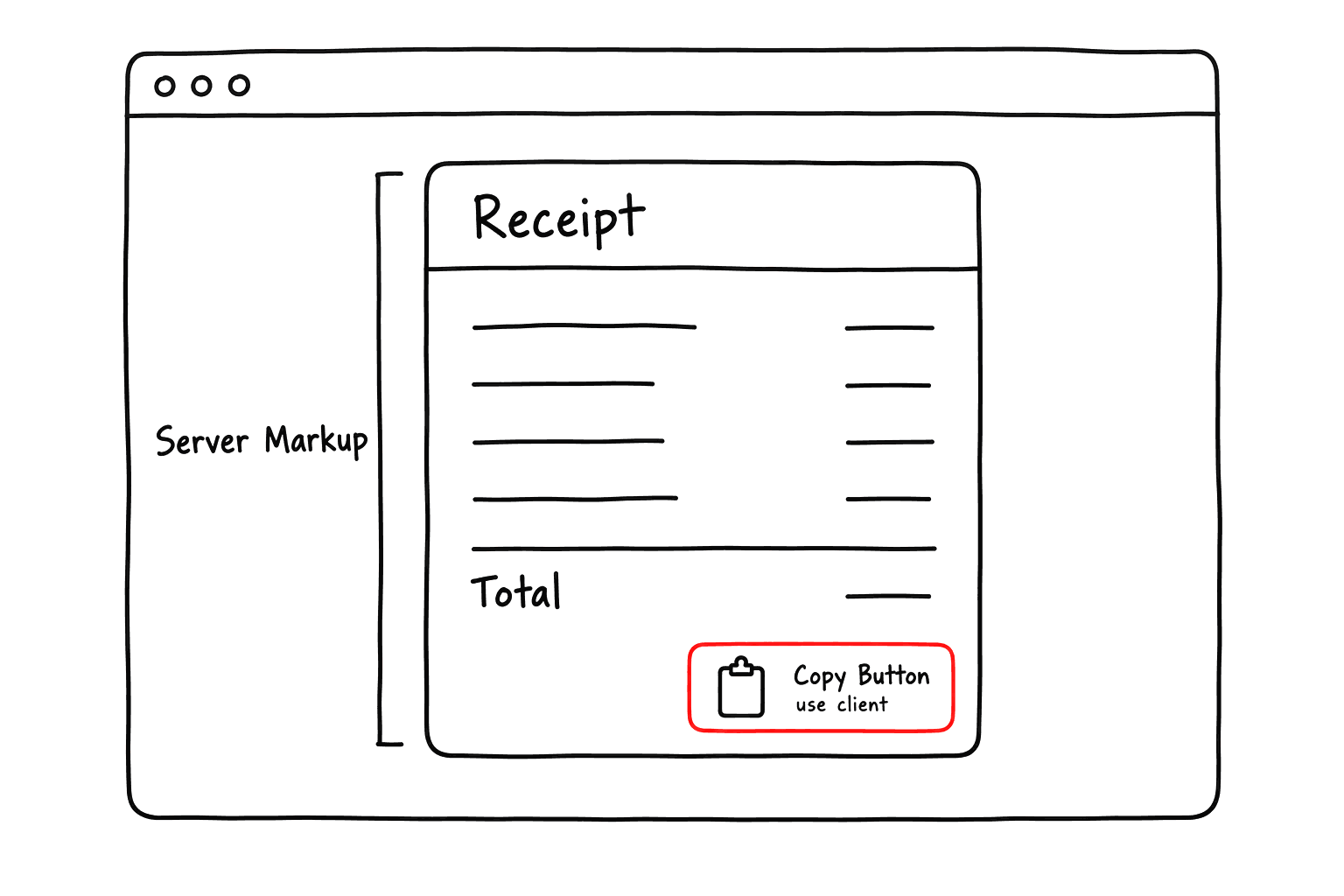
The copy button, in code
The client part is a file this small. It adds one behaviour, copying on click, and renders its children untouched:
apps/koyo/ui/CopyOrderId.tsx
The page around it stays a server component. The receipt, its lines and even the button's label are written in the page and passed in as children, so they stay server markup however large they grow:
apps/koyo/page/(public)/icecreamOrder/[icecreamOrderId]/_index.tsx
That is the whole client cost of a copy button: one handler and one children pass-through.
Four more ways to keep markup on the server
Split compound components
Tab is four small client pieces: Tab, Tab.Menus, Tab.Menu and Tab.Panel. Panel bodies arrive as children, so they never enter the bundle. One client file with a mode useState and every panel inlined is the opposite.
<Tab.Panel menu="spec">…</Tab.Panel>Use named slots
Layout.Navbar takes title, back, left, right and children. A client shell holds server content in five places instead of swallowing it.
<Layout.Navbar title={…} right={…}>Derive on the server
Display and predicate logic goes on Light<Model>, which both sides hold. An enum-to-class lookup goes in a module-scope as const map.
order.isNew() · statusClass[order.status]Load heavy islands late
A map, editor or chart sits behind a ui/<Folder>/index_.tsx and lazy() pair, with a server-safe index.tsx beside it. Merging the pair into one file breaks RSC.
ui/Map/index_.tsx + lazy()Measuring The Split
None of this is a matter of taste, so it is measured rather than argued about in review. akan quality ssr counts the JSX elements on each side and reports, per app and lib, the share kept on the server, plus the six findings below.
- It reads the .tsx files under ui/ and lib/ of every app and lib.
- page/ and webkit/ are not counted, so moving markup into a route neither raises nor lowers the number.
Terminal
Every finding is named akan.ssr.<rule>. Here is what each rule means and how to fix it:
RuleMeaning → fix
unnecessary-use-client
The file starts with "use client" but uses none of the five features.
→ Delete that first line.
client-static-component
A component in a client file draws four or more elements with no client feature.
→ Move it to a file without "use client".
client-static-markup
Ten or more elements wrap only one or two client features.
→ Keep only the interactive leaf client and pass the rest in as children.
client-mount-load
A useEffect(…, []) loads server data after the page mounts.
→ Fetch it in the route and pass it down as an init prop.
module-missing-server-view
A module draws only from Template, Zone and Util, with no Unit or View.
→ Add a Unit or View and let the Zone hand its rows to it.
template-client-state
A Template keeps form state in useState instead of the store.
→ Bind each field to the store:
What is not flagged
- A client-only third-party package and an index_.tsx lazy() boundary. Both are legitimate reasons for "use client".
- A Zone, Template or Util inside a module. Its role requires "use client" even when today's body does not use it.
- A fetch started by the user, such as a lookup inside onClick. The server could not have done it in advance; only loads at mount time are findings.
Run it before and after any change that touches a .tsx file, and use --format json to wire it into CI.
With the boundary settled, the next page covers what fills each side of it: the akanjs/ui shells that render a list, a detail view and a form without a hand-written loading state, and the generated helpers underneath them.